Business server specifications often contain terms that do not appear in ordinary desktop computer descriptions.
Features such as ECC memory, RAID, redundant power supplies and hot-swappable components are designed to improve reliability, availability and serviceability. However, they do not all provide the same type of protection.
Understanding these terms helps businesses compare server quotations more accurately and avoid paying for features they do not need—or overlooking protections that are important for critical workloads.
ECC Memory
ECC stands for error-correcting code.
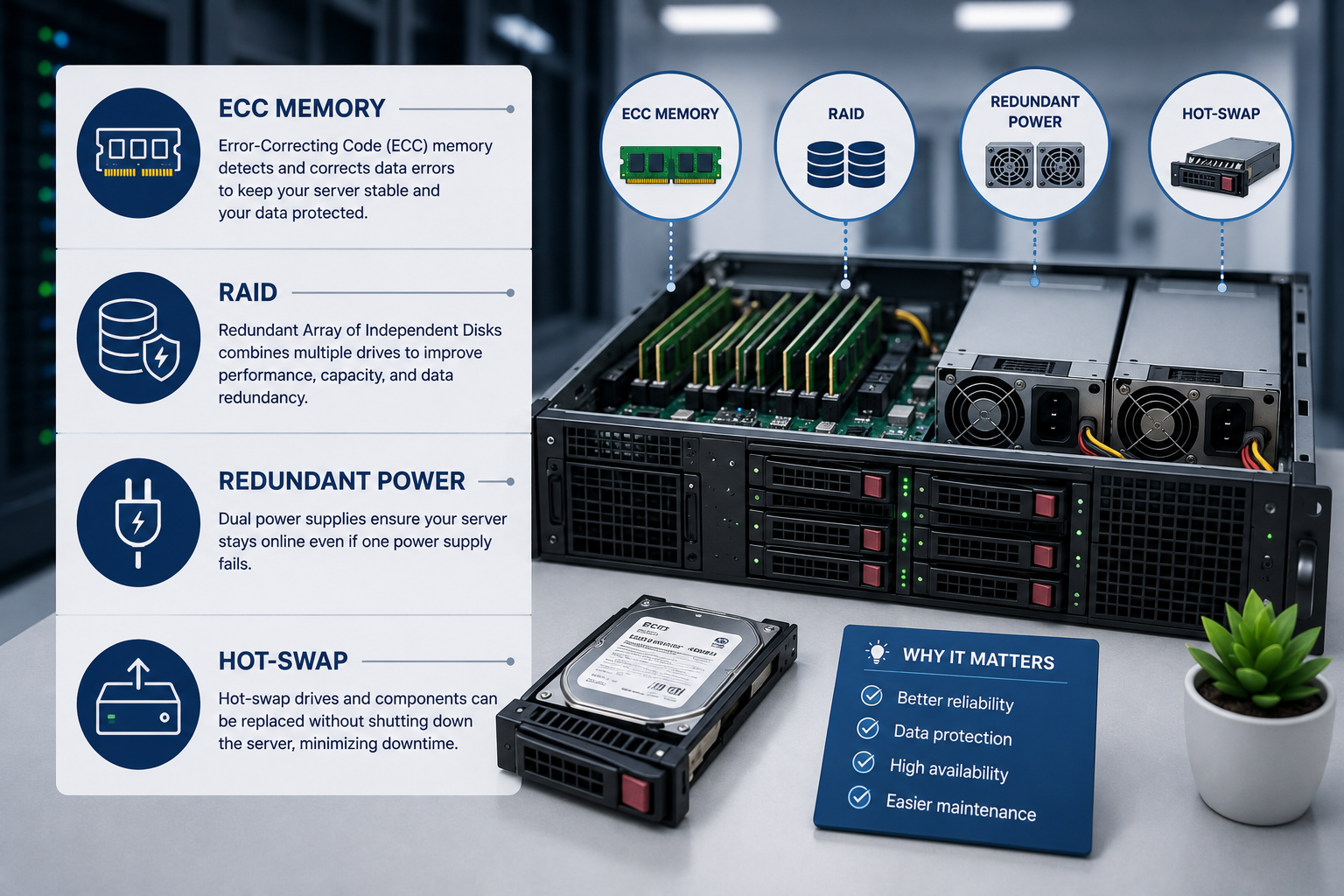
ECC memory can detect and correct certain types of data errors that occur while information is stored in RAM. These errors may be caused by electrical interference, hardware faults or other physical effects.
In a standard desktop computer, a memory error may result in an application crash or incorrect data. On a business server, the consequences can be more serious because the system may support databases, virtual machines or many users simultaneously.
ECC memory helps reduce the risk of:
- Unexpected system crashes
- Data corruption
- Incorrect calculations
- Virtual-machine failures
- Application instability
- Difficult-to-diagnose intermittent faults
ECC does not prevent every possible memory failure. However, it adds an important layer of protection for systems expected to operate continuously.
Registered and Unbuffered ECC Memory
Not all ECC memory is the same.
Unbuffered ECC Memory
Unbuffered ECC memory is commonly used in entry-level servers and professional workstations.
It provides error correction but usually supports lower total memory capacities than registered memory.
Registered ECC Memory
Registered memory, often identified as RDIMM, includes a register between the memory controller and the memory modules.
This reduces the electrical load on the processor’s memory controller and allows servers to support more memory modules and higher total capacities.
Registered ECC memory is commonly found in:
- Virtualisation servers
- Database servers
- Enterprise application servers
- Multi-processor systems
- Memory-intensive infrastructure
Memory types are not normally interchangeable. A server designed for registered memory may not support unbuffered modules, and different memory types should not be mixed unless the manufacturer explicitly allows it.
RAID
RAID stands for redundant array of independent disks.
RAID combines multiple physical drives into a storage arrangement designed to improve resilience, performance or both.
The operating system may see the RAID array as one logical storage volume, even though several drives are involved.
RAID can help a server continue operating after certain drive failures, depending on the selected RAID level.
However, RAID is not a backup.
It does not protect against:
- Accidental file deletion
- Ransomware
- Application corruption
- Theft
- Fire or flooding
- Complete server failure
- Damage to the entire storage array
A server using RAID still requires an independent backup and recovery plan.
RAID 0
RAID 0 distributes data across two or more drives.
Its main purpose is performance and capacity. It does not provide redundancy.
If one drive fails, the entire array may become inaccessible.
RAID 0 may be suitable for temporary or non-critical data where performance is important and the information can be recreated easily.
It is generally unsuitable for important business data unless another protection mechanism is in place.
RAID 1
RAID 1 stores matching copies of data on two drives.
If one drive fails, the server can normally continue operating from the remaining drive.
Its advantages include:
- Simple configuration
- Good read performance
- Straightforward recovery from one drive failure
- Strong protection for small storage volumes
The main disadvantage is usable capacity. Two equal-sized drives provide approximately the capacity of one drive because the second stores a mirror copy.
RAID 1 is often used for operating-system volumes and smaller business servers.
RAID 5
RAID 5 distributes data and parity information across at least three drives.
The array can normally tolerate the failure of one drive.
Compared with mirroring, RAID 5 provides a larger proportion of usable capacity. However, write performance may be lower because parity information must be calculated and stored.
Rebuilding a RAID 5 array after a drive failure can take considerable time, especially with large-capacity drives. Performance may be reduced during the rebuild, and the array remains vulnerable if another drive fails before recovery is complete.
RAID 5 may be appropriate for read-heavy workloads where usable capacity is important, but it should be evaluated carefully for large or heavily used arrays.
RAID 6
RAID 6 is similar to RAID 5 but uses additional parity information.
It can normally tolerate two simultaneous drive failures.
This provides greater protection during lengthy rebuild operations, particularly when an array contains many drives or high-capacity disks.
The trade-offs include:
- Lower usable capacity
- Additional parity overhead
- Potentially slower write performance
- Requirement for at least four drives
RAID 6 is commonly considered for larger storage arrays where resilience is more important than maximum write speed.
RAID 10
RAID 10 combines mirroring and striping.
It normally requires at least four drives and provides approximately half of the total raw drive capacity as usable storage.
Its advantages can include:
- Strong read and write performance
- Faster rebuilds than parity-based RAID
- Protection against certain multiple-drive failures
- Suitability for demanding applications
RAID 10 is often used for:
- Databases
- Virtual machines
- Transactional applications
- High-activity storage
- Systems requiring both performance and resilience
Its main disadvantage is cost because a significant portion of installed drive capacity is used for mirrored copies.
Hardware and Software RAID
RAID can be managed through hardware or software.
Hardware RAID
Hardware RAID uses a dedicated controller installed in the server.
The controller may include:
- Dedicated processing
- Cache memory
- Battery or flash-backed cache protection
- Drive monitoring
- Advanced management tools
Hardware RAID can provide predictable performance and centralised management, but it adds cost and may create dependency on a specific controller.
Software RAID
Software RAID is managed by the operating system or hypervisor.
It can reduce hardware cost and may offer greater flexibility, depending on the platform.
However, performance, recovery procedures and feature support vary between operating systems.
Businesses should confirm how an array can be recovered if the controller, operating system or server itself fails.
Hot-Spare Drive
A hot spare is an installed but unused drive reserved for RAID recovery.
When a protected drive fails, the RAID controller may automatically begin rebuilding the array onto the hot spare.
This can reduce the amount of time the array remains in a degraded state.
A hot spare does not increase normal usable storage capacity. It is held in reserve for failure recovery.
It also does not remove the need to replace the failed drive. After recovery, the business must restore the required spare capacity.
Redundant Power Supplies
A redundant power-supply configuration includes two or more power-supply units in the same server.
Under normal operation, the power supplies may share the electrical load. If one fails, the remaining unit can keep the server running, provided that it has sufficient capacity.
This is commonly called 1+1 redundancy.
Redundant power supplies protect against the failure of an individual power-supply unit. They do not automatically protect against:
- Loss of electricity to the building
- Failure of a shared power strip
- Uninterruptible power-supply failure
- Generator failure
- Electrical problems affecting both supplies
For stronger protection, each server power supply should connect to a separate power source where the infrastructure supports it.
For example, one supply may connect to power distribution unit A and the other to power distribution unit B.
Redundant Power Is Not Backup Power
Redundant power supplies and uninterruptible power supplies serve different purposes.
A redundant power supply helps the server remain operational if one internal power unit fails.
A UPS supplies temporary electricity when the main power source fails or becomes unstable.
A resilient installation may therefore include:
- Two server power supplies
- Separate power distribution paths
- One or more UPS systems
- Generator support
- Power monitoring
Installing two server power supplies into the same unprotected outlet provides protection against power-supply failure, but not against loss of the shared outlet or electrical circuit.
Hot-Swap Components
A hot-swappable component can be removed and replaced while the server remains powered on.
This can reduce downtime during maintenance or component failure.
Common hot-swappable server components include:
- Storage drives
- Power supplies
- Cooling fans
- Some expansion modules
Hot-swap capability is particularly valuable for systems that must remain available during business hours.
However, a component should be replaced while the server is running only when:
- The server supports hot-swapping for that component
- The correct removal procedure is followed
- The failed component has been identified accurately
- The replacement part is compatible
- The operating system or management platform confirms that removal is safe
A drive tray that can be physically removed does not always mean the drive is safe to remove under every configuration.
Hot-Swap Drives
Hot-swap drive bays allow a failed disk to be replaced without shutting down the server.
They are commonly used with RAID-protected storage.
When a drive fails, the usual process is:
- Confirm the failed drive through the server’s management tools.
- Identify the correct physical drive.
- Remove the failed drive.
- Insert a compatible replacement.
- Monitor the RAID rebuild.
- Confirm that the array returns to a healthy state.
Removing the wrong drive from a degraded array can cause data loss.
Clear drive labelling, monitoring and documented procedures are therefore important.
Hot-Plug and Hot-Swap
The terms hot-plug and hot-swap are often used interchangeably, but they may describe slightly different capabilities.
Hot-plug generally means a device can be connected or disconnected while the system is powered on.
Hot-swap usually implies that a failed component can be replaced during operation without interrupting the service.
Manufacturers may use these terms differently, so buyers should review the server documentation rather than relying only on the product label.
Redundant Cooling Fans
Many enterprise servers use multiple hot-swappable cooling fans.
If one fan fails, the remaining fans may increase speed to maintain safe operating temperatures until replacement.
This can help prevent an immediate shutdown, but the failed fan should still be replaced quickly.
A server with a cooling fault may produce more noise and use more power because the remaining fans operate at higher speeds.
Redundant internal cooling also does not replace the need for suitable room or data-centre cooling.
Dual Network Interfaces
Business servers often include multiple network ports.
These ports may be used for:
- Network redundancy
- Increased bandwidth
- Separating application traffic
- Storage connectivity
- Virtual-machine traffic
- Management access
- Backup traffic
Network-interface teaming or bonding can allow traffic to continue if one adapter or cable fails.
However, true network redundancy may also require separate switches, cables and network paths.
Connecting two server ports to the same switch does not protect against complete failure of that switch.
Out-of-Band Management
Out-of-band management provides remote access to the server independently of its main operating system.
Depending on the manufacturer, the platform may allow administrators to:
- Turn the server on or off
- View hardware health
- Access the console remotely
- Change firmware settings
- Install an operating system
- Review event logs
- Monitor temperature and power
- Receive hardware alerts
This feature is especially useful for servers in remote offices, colocation facilities and data centres.
It can reduce the need for an engineer to visit the site when the operating system becomes inaccessible.
Some advanced management features require an additional licence.
Enterprise Drives
Enterprise drives are designed for heavier workloads and longer operating periods than ordinary consumer drives.
They may provide:
- Higher endurance
- Better vibration tolerance
- Firmware designed for RAID
- Longer warranties
- More detailed health monitoring
- Support for continuous operation
A consumer SSD may appear less expensive, but it may not provide the endurance or failure behaviour required by a busy server.
Drive selection should consider workload, write volume, RAID compatibility and expected service life—not only capacity and interface type.
Self-Encrypting Drives
A self-encrypting drive performs hardware-based encryption within the storage device.
It can help protect data if the drive is removed or stolen.
However, encryption still requires appropriate key management and system configuration.
Losing the encryption key may make the data inaccessible, while poor access controls can reduce the security benefit.
Drive encryption also does not replace secure data erasure when equipment is retired or transferred.
TPM
TPM stands for trusted platform module.
It is a security component used to store cryptographic information and support features such as:
- Secure boot
- Drive encryption
- Device identity
- Platform integrity checks
- Credential protection
A TPM helps create a trusted foundation for the operating system, but it is only one part of server security.
The server still requires secure configuration, updates, access control, monitoring and backups.
N+1 Redundancy
N+1 describes a configuration with enough components to support the required workload, plus one additional component.
For example, if three fans are required to cool the server, an N+1 design may include four fans.
If one fails, the remaining three can continue supporting the system.
N+1 may apply to:
- Cooling fans
- Power supplies
- Network paths
- Storage systems
- Data-centre cooling
- Other infrastructure components
A buyer should ask what happens when one component fails rather than accepting the word “redundant” without further detail.
Fault Tolerance and High Availability
Fault tolerance means a system can continue operating when certain components fail.
High availability is a wider design objective focused on reducing service interruption.
A server with ECC memory, RAID and redundant power supplies has useful component-level protection, but it can still fail because of:
- Motherboard failure
- Operating-system corruption
- Application errors
- Network outages
- Human error
- Security incidents
- Data-centre problems
Higher availability may require:
- Multiple servers
- Clustering
- Replicated storage
- Load balancing
- Secondary network paths
- Tested backups
- Disaster recovery
Redundant server components reduce risk, but they do not remove every single point of failure.
Which Features Does a Small Business Need?
Not every server requires every enterprise feature.
A small file or application server may reasonably include:
- ECC memory
- RAID-protected drives
- Hot-swap storage
- Redundant power supplies
- Remote management
- A separate backup system
A less critical test server may not need dual power supplies or hot-swap components if short periods of downtime are acceptable.
The appropriate level of redundancy depends on:
- Importance of the workload
- Cost of downtime
- Availability of technical support
- Recovery time requirements
- Budget
- Location of the server
- Backup and replacement arrangements
The business should select features according to risk rather than purchasing the most complex configuration automatically.
Questions to Ask When Comparing Servers
Before approving a server quotation, ask:
- Does the server use ECC memory?
- Which memory type is installed?
- How much memory expansion capacity remains?
- Which RAID level is proposed?
- Is the quoted capacity raw or usable?
- Does the server include a hardware RAID controller?
- Is protected write cache included?
- Are the drives hot-swappable?
- Is a hot-spare drive included?
- Are the power supplies redundant?
- Can each power supply connect to a separate power source?
- Are cooling fans redundant and hot-swappable?
- Is remote management included?
- Does remote console access require an extra licence?
- Are enterprise drives being supplied?
- What happens if a component fails?
- How quickly are replacement parts available?
- What warranty and response time are included?
These questions make it easier to compare configurations that may initially appear similar.
Final Recommendation
ECC memory helps protect active data from certain memory errors.
RAID can improve storage resilience and performance, but it must always be supported by an independent backup strategy.
Redundant power supplies reduce the risk of downtime caused by one failed power unit, while hot-swappable components allow certain repairs to be completed without shutting down the server.
These features are valuable because they address different types of failure. They should be selected as part of a complete availability plan based on the importance of the workload and the cost of interruption.
Ila Express supplies business and enterprise servers with ECC memory, RAID storage, redundant power, hot-swap components and remote-management options.
Contact Ila Express to compare server configurations and choose the appropriate level of performance, redundancy and support for your business.