Backups are essential, but simply having a backup does not tell a business how much data it could lose, how quickly systems could return or how far back recovery copies remain available.
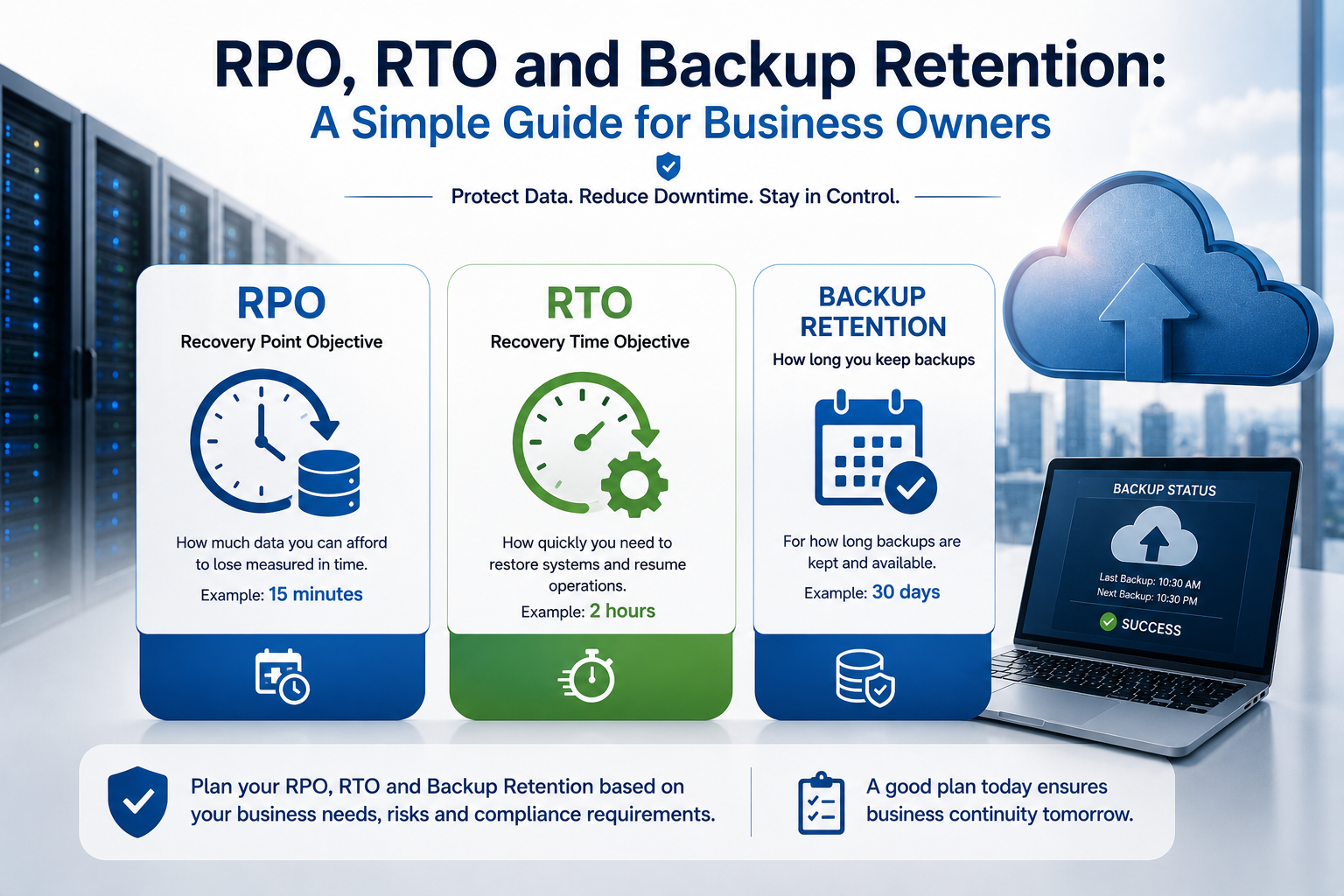
Three terms help answer those questions:
- Recovery point objective, or RPO
- Recovery time objective, or RTO
- Backup retention
These concepts are often discussed in technical language, but they are fundamentally business decisions.
RPO defines how much recent data the organisation can afford to lose. RTO defines how long a service can remain unavailable. Backup retention defines how long older recovery points are kept.
Understanding all three helps a business choose the right backup frequency, storage design, recovery service and budget.
What Is RPO?
RPO stands for recovery point objective.
It describes the maximum amount of recent data the business is prepared to lose after an incident.
RPO is usually expressed as a period of time.
Examples include:
- 24 hours
- 8 hours
- 1 hour
- 15 minutes
- Near zero
An RPO of four hours means the business should be able to restore data from no more than four hours before the incident.
If the last successful backup was ten hours old, the recovery process would not meet that objective.
A Simple RPO Example
Imagine a company backs up its customer database once every night at midnight.
At 4:00 p.m. the next day, the database becomes corrupted.
The most recent usable backup may be 16 hours old.
The company could lose all transactions, updates and customer records created since midnight.
In that case, the practical RPO is up to 24 hours, even though the backup process runs successfully every day.
A business that cannot afford to recreate a full day of work needs more frequent protection.
RPO Is About Data Loss, Not Downtime
RPO answers:
How much recent information could we lose?
It does not answer:
How long will the system remain unavailable?
A company may have backups every 15 minutes but still require eight hours to rebuild the server.
That design could provide a short RPO but a long RTO.
The two requirements should be evaluated separately.
What Determines the Appropriate RPO?
The right RPO depends on how quickly data changes and how difficult it would be to recreate lost work.
Consider:
- Number of transactions
- Value of each transaction
- Frequency of file changes
- Number of employees affected
- Ability to recreate missing information
- Customer impact
- Legal or contractual requirements
- Cost of more frequent backup
A static information website may tolerate a 24-hour RPO.
An active ordering, financial or manufacturing system may need a much shorter target.
RPO by Workload Type
Different systems often need different RPOs.
| Workload | Possible business requirement |
|---|---|
| Static website | 24 hours |
| Shared office files | 4–8 hours |
| Customer relationship system | 1–4 hours |
| E-commerce database | 15–60 minutes |
| Financial transaction system | Minutes or near zero |
These are examples, not universal rules.
The correct target should be based on the actual consequences of missing data.
How Backup Frequency Relates to RPO
Backup frequency is one of the main controls used to meet an RPO.
If the business needs an RPO of one hour, a daily backup is clearly insufficient.
Possible protection methods include:
- Hourly backups
- Continuous data protection
- Database transaction-log backups
- Storage snapshots
- Virtual-machine replication
- Application-level replication
The selected method should support the required frequency without damaging application performance or creating unmanageable cost.
Backup Frequency Does Not Guarantee RPO
A backup schedule may say that jobs run every hour, but the practical RPO can still be longer if:
- Jobs fail
- Backups remain incomplete
- Replication is delayed
- The application is not protected consistently
- Storage capacity is exhausted
- Alerts are ignored
The business should monitor successful completion and verify that recovery points are usable.
An unmonitored schedule is not a reliable RPO.
What Is RTO?
RTO stands for recovery time objective.
It describes the maximum acceptable time for restoring a service after an interruption.
RTO is also expressed as a period of time.
Examples include:
- 30 minutes
- 2 hours
- 8 hours
- One business day
- Several days
An RTO of two hours means the service should return within two hours of the incident or disaster being declared.
A Simple RTO Example
Imagine a file server fails at 9:00 a.m.
The organisation must:
- Confirm the failure.
- Contact technical support.
- Provision replacement infrastructure.
- Restore the operating system.
- Recover files.
- Test permissions.
- Reconnect users.
If employees regain access at 3:00 p.m., the actual recovery time is six hours.
A business requiring a two-hour RTO would need a faster recovery design.
RTO Is About Service Availability
RTO answers:
How long can the business operate without this system?
The answer should include the time needed for:
- Detection
- Decision-making
- Technical recovery
- Data restoration
- Testing
- User reconnection
- Business approval
The restore operation itself may be only one part of the total recovery time.
What Determines the Appropriate RTO?
The correct RTO depends on the business impact of downtime.
Consider:
- Lost revenue
- Employee inactivity
- Customer access
- Manufacturing interruption
- Missed transactions
- Contractual penalties
- Safety or operational risk
- Alternative manual processes
- Support availability
A website used only for company information may tolerate several hours of downtime.
A customer ordering system may require recovery within minutes or one hour.
RTO by Workload Type
Possible examples include:
| Workload | Possible business requirement |
|---|---|
| Archive system | Several days |
| Internal file server | 4–8 hours |
| Accounting application | 2–4 hours |
| Customer portal | 1–2 hours |
| Payment or ordering platform | Minutes to 1 hour |
Again, the requirement should be defined by business impact rather than copied from another organisation.
RPO and RTO Work Together
RPO and RTO describe different parts of recovery.
| Measure | Main question |
|---|---|
| RPO | How much recent data can we lose? |
| RTO | How long can the service remain unavailable? |
A business could have:
- Short RPO and long RTO
- Long RPO and short RTO
- Short RPO and short RTO
- Long RPO and long RTO
Each combination requires a different technical design and cost level.
Short RPO, Long RTO
A business may back up data every 15 minutes but restore it only after replacement infrastructure is built.
This provides limited data loss but potentially lengthy downtime.
It may suit a workload where recent data is valuable but continuous access is less important.
Long RPO, Short RTO
A standby server may start quickly using a copy from the previous night.
The service returns fast, but recent data may be missing.
This may be acceptable for a system where availability matters more than the latest changes.
Short RPO, Short RTO
This is the most demanding combination.
It may require:
- Continuous replication
- Standby infrastructure
- Automated failover
- High-availability databases
- Frequent snapshots
- Strong monitoring
- Managed recovery support
This design normally costs more and requires regular testing.
It should be reserved for workloads where downtime and data loss have significant business impact.
Long RPO, Long RTO
This is the least expensive recovery model.
The business may rely on daily backups and manual rebuild.
It can be appropriate for:
- Archives
- Test systems
- Non-critical internal tools
- Systems with alternative manual processes
Not every workload needs expensive rapid recovery.
What Is Backup Retention?
Backup retention defines how long recovery points are kept.
A backup can run successfully and still be of limited value if older copies are removed too quickly.
Retention may be expressed as:
- Seven daily backups
- Four weekly backups
- Twelve monthly backups
- Seven years of archives
- Thirty days of version history
Retention determines how far back the business can recover.
A Simple Retention Example
Suppose a company keeps backups for seven days.
A database problem begins gradually and is discovered after ten days.
Every retained backup may already contain the corruption.
The business may have frequent backups and still lack a clean recovery point.
Longer retention can protect against problems discovered late.
Retention Is Different From Frequency
Backup frequency answers:
How often is a recovery point created?
Retention answers:
How long is each recovery point kept?
A service may run backups every hour but retain them for only one day.
Another service may create one daily backup and retain it for one year.
Both frequency and retention should reflect the business requirement.
Why Businesses Need Older Backups
Older recovery points may be required after:
- Delayed discovery of corruption
- Ransomware
- Accidental deletion noticed late
- Employee misuse
- Incorrect application updates
- Audit requests
- Legal requirements
- Customer disputes
A short retention period may provide rapid recent recovery but no useful historical record.
Common Retention Models
A business may use a structure such as:
- Hourly copies retained for one or two days
- Daily copies retained for one month
- Weekly copies retained for several months
- Monthly copies retained for one or more years
This is sometimes known as a grandfather-father-son style rotation.
The exact structure should depend on operational and legal needs.
Retention and Storage Cost
Longer retention requires more storage.
Cost depends on:
- Total protected data
- Daily change rate
- Compression
- Deduplication
- Backup method
- Storage tier
- Number of recovery points
Retaining every full backup indefinitely is rarely efficient.
Backup platforms often use incremental storage and lifecycle policies to control cost.
The organisation should balance historical protection with realistic recovery needs.
Retention and Legal Requirements
Some information must be preserved for legal, financial, contractual or industry reasons.
However, backup retention should not automatically be used as the organisation’s formal archive system.
Backups are designed primarily for recovery.
Long-term records may require:
- Search capability
- Legal hold
- Controlled deletion
- Consistent indexing
- Access auditing
- Record classification
The organisation’s legal or compliance advisers should confirm retention obligations.
Backup Is Not the Same as Archive
Backup and archive have different purposes.
Backup supports restoration after loss or damage.
Archive preserves information for long-term reference or compliance.
An archive may retain selected records for years while ordinary backups rotate more frequently.
Using backup alone for long-term archive can create difficulties with search, access and controlled deletion.
RPO, RTO and Retention Must Be Defined Per System
One backup policy should not automatically apply to every business workload.
Systems may include:
- File servers
- Databases
- Websites
- Customer portals
- Accounting
- Virtual machines
- SaaS applications
- Employee computers
Each has different business importance and data-change patterns.
Create a simple recovery classification for every important system.
Classify Systems by Business Impact
A practical approach is to divide systems into priority levels.
Tier 1: Critical
These systems create immediate and serious impact when unavailable.
They may need:
- Very short RTO
- Very short RPO
- Frequent testing
- Standby infrastructure
- Continuous support
Tier 2: Important
These systems affect productivity or customer service but can tolerate a limited interruption.
They may use:
- Frequent backup
- Same-day recovery
- Documented manual process
- Managed support
Tier 3: Standard
These systems can remain unavailable longer without serious impact.
They may use:
- Daily backup
- Recovery within one or more days
- Lower-cost storage
This classification helps avoid applying expensive recovery to low-priority systems.
Ask Business Owners, Not Only IT
RPO and RTO should not be decided only by technical staff.
Business managers understand:
- Which processes depend on the system
- How much downtime is acceptable
- What data can be recreated
- Which deadlines matter
- What customers expect
- What alternative processes exist
IT can explain the cost and technical options.
The final requirement should be agreed jointly.
Calculate the Cost of Data Loss
To set RPO, estimate the impact of losing recent information.
Consider:
- Number of transactions per hour
- Average transaction value
- Employee time needed to recreate work
- Customer contact required
- Risk of inaccurate records
- Regulatory consequences
For example, if a system processes hundreds of orders per hour, a four-hour RPO may create a serious financial and operational problem.
If a document repository changes only a few times per day, the same RPO may be acceptable.
Calculate the Cost of Downtime
To set RTO, estimate the effect of the system being unavailable.
Consider:
- Revenue lost per hour
- Number of employees unable to work
- Customer dissatisfaction
- Contract penalties
- Manual workaround capacity
- Recovery labour
- Reputational damage
The cost of downtime often changes by time and day.
One hour during a weekend may have little impact, while one hour during month-end processing may be severe.
Recovery Requirements Affect Cost
Shorter RPO and RTO targets usually cost more.
The business may need:
- More frequent backup
- Additional storage
- Replication
- Standby servers
- Faster network links
- High-availability databases
- 24-hour support
- Automated failover
- More frequent testing
The organisation should not request near-zero data loss and immediate recovery for every system unless the business impact justifies the expense.
Backup and Restore
A basic backup-and-restore design usually provides the lowest cost.
The business stores recovery copies and builds or repairs infrastructure after an incident.
This may provide:
- Moderate or long RTO
- RPO based on backup frequency
- Flexible retention
It is suitable where several hours or days of downtime are acceptable.
Snapshots
Snapshots can create quick recovery points for virtual machines or storage volumes.
They may support:
- Fast rollback
- Frequent recovery points
- Short-term retention
- Recovery before updates
Snapshots can help improve RPO and RTO, but they may depend on the same platform or account as production.
They should normally be combined with independent backup.
Replication
Replication copies data to another server, storage system or region.
It can support:
- Short RPO
- Faster failover
- Reduced restore time
However, replication can also copy:
- Deletion
- Corruption
- Ransomware
- Incorrect changes
Replication improves availability but does not replace retained historical backups.
Standby Infrastructure
A standby environment can reduce RTO.
It may include:
- Preconfigured server
- Replicated database
- Secondary cloud region
- Warm standby application
- Reserved network configuration
The faster the standby must take over, the more resources must normally remain active and maintained.
High Availability
High availability is designed to keep services operating during certain component failures.
It may reduce or remove some recovery events through:
- Multiple servers
- Load balancing
- Replicated storage
- Database clustering
- Automatic failover
High availability supports short RTO, but it does not protect against every form of data loss.
Backup retention is still required.
SaaS Services Also Need Recovery Planning
Businesses may assume that software-as-a-service providers manage all backup and recovery.
The provider usually protects the underlying platform, but the customer may still need to consider:
- Deleted users
- Deleted emails
- File-version history
- Retention settings
- Ransomware
- Malicious deletion
- Legal retention
- Data export
Review the provider’s actual recovery features and decide whether third-party backup is necessary.
RPO and Databases
Databases often require more frequent protection than file servers.
Methods may include:
- Full database backup
- Incremental backup
- Transaction-log backup
- Continuous replication
- Application-consistent snapshots
A file copy of an active database may not be recoverable.
The backup method should be supported by the database platform and tested.
RPO and Shared Files
Shared files may change throughout the working day.
Suitable protection may include:
- Frequent file backup
- Version history
- Snapshots
- Cloud synchronisation
- Off-site copies
Versioning can help users recover recent file changes, while backup protects against wider incidents.
Both may be useful.
RTO and Large Data Volumes
Large backups take longer to restore.
Recovery time depends on:
- Data volume
- Number of files
- Storage speed
- Network bandwidth
- Backup platform
- Compression
- Encryption
- Provider response
A company may have a one-hour RTO that cannot be met because restoring several terabytes takes many hours.
The requirement should be validated through real testing.
Recovery Time Includes Decision-Making
Businesses sometimes measure only the technical restore.
Actual RTO may include:
- Incident detection
- Investigation
- Approval to recover
- Provider contact
- Infrastructure preparation
- Data restoration
- Application testing
- User access
- Business acceptance
Slow communication or unclear responsibility can extend downtime significantly.
Define Who Declares a Disaster
The recovery plan should identify who can authorise:
- Server restoration
- Failover
- Use of the recovery region
- Application rollback
- Customer communication
- External support escalation
Waiting for approval during an incident can consume a large part of the RTO.
The decision process should be simple and documented.
Test Recovery Regularly
RPO and RTO remain assumptions until tested.
Recovery testing should confirm:
- Backups are usable
- Required recovery points exist
- Credentials work
- Applications start
- Databases are consistent
- Users can log in
- Dependencies connect
- Actual recovery time meets the target
Record the results and compare them with the defined objectives.
Measure Actual RPO
During testing, identify the timestamp of the restored data.
Compare it with the incident or recovery-test time.
For example:
- Test begins at 10:00 a.m.
- Latest usable recovery point is 8:30 a.m.
- Actual RPO is 90 minutes
If the requirement is one hour, the protection method does not meet the target.
Measure Actual RTO
Record every stage of recovery.
For example:
| Recovery stage | Time |
|---|---|
| Detect and confirm incident | 20 minutes |
| Approve recovery | 15 minutes |
| Provision server | 30 minutes |
| Restore data | 2 hours |
| Test application | 45 minutes |
| Reconnect users | 10 minutes |
The actual recovery time is the total, not only the two-hour data restore.
Monitor Backup Retention
Retention policies should be monitored so that recovery points are not removed unexpectedly.
Problems may occur because of:
- Storage limits
- Configuration changes
- Failed cleanup jobs
- Licence limits
- Provider policy changes
- Manual deletion
Reports should show:
- Oldest available recovery point
- Number of retained versions
- Storage usage
- Immutability status
- Failed backup jobs
The business should verify that actual retention matches the agreed policy.
Protect Retained Backups
Long retention is useful only when the backups remain secure.
Protection may include:
- Encryption
- Separate credentials
- Multi-factor authentication
- Restricted deletion
- Immutable storage
- Offline copies
- Cross-account storage
- Monitoring
A long history of backups can still be lost if one compromised account can delete them all.
Consider Immutable Retention
Immutable backup prevents recovery points from being changed or deleted during a defined period.
It can help protect against:
- Ransomware
- Malicious administrators
- Compromised accounts
- Accidental deletion
The retention period should be selected carefully because immutable data may continue generating storage cost and cannot normally be removed early.
Avoid Retaining Data Forever Without a Reason
Indefinite retention increases:
- Storage cost
- Privacy risk
- Legal exposure
- Management complexity
- Recovery search time
The business should retain information only as long as required for recovery, legal or operational purposes.
Backup policies should align with broader data-retention and deletion policies.
Document the Recovery Policy
For each system, record:
- Business owner
- Technical owner
- RPO
- RTO
- Backup frequency
- Retention period
- Backup location
- Recovery method
- Support contact
- Last test date
This creates a practical reference for management and technical teams.
It also helps compare supplier proposals on an equal basis.
Questions to Ask a Backup Provider
Before purchasing a backup or recovery service, ask:
- How often are recovery points created?
- How are failed jobs detected?
- What is the expected RPO?
- How long are backups retained?
- Are hourly, daily and monthly copies available?
- Are backups immutable?
- Where are copies stored?
- How quickly can a file be restored?
- How quickly can a complete server be restored?
- Is replacement infrastructure included?
- Are recovery tests included?
- Who performs restoration?
- Is emergency support available?
- Are restore or data-transfer charges applied?
- What happens when storage reaches its limit?
The answers should be documented rather than assumed.
Common Planning Mistakes
Using One RPO for Every System
Critical databases and inactive archives do not need the same protection.
Defining RPO Without Monitoring Backups
A schedule does not prove that usable recovery points exist.
Defining RTO Without Testing Restore Speed
Large datasets may take far longer to recover than expected.
Confusing Retention With Frequency
Frequent backups can still provide very little history.
Keeping Retention Too Short
Corruption may be discovered after every clean copy has expired.
Requesting Near-Zero Recovery for Everything
The cost may be unnecessary and difficult to support.
Ignoring SaaS Data
Cloud applications still require retention and recovery review.
Failing to Assign Recovery Ownership
Technical tools do not help when no one knows who should act.
A Practical RPO, RTO and Retention Checklist
For each important system, ask:
- How often does the data change?
- How much recent data can the business afford to lose?
- What is the required RPO?
- How long can the system remain unavailable?
- What is the required RTO?
- How far back may the business need to recover?
- What retention period is required?
- Are legal or contractual rules involved?
- Which backup method supports the RPO?
- Which recovery design supports the RTO?
- Are backups separated from production?
- Are any recovery points immutable?
- Who monitors backup completion?
- Who declares a recovery event?
- Who performs the restore?
- Has the process been tested?
- What were the actual RPO and RTO during the test?
- Does the cost match the business importance of the system?
Clear answers turn backup from a technical activity into a measurable business-control process.
Final Recommendation
Use RPO to define how much recent data the business can afford to lose.
Use RTO to define how quickly the service must return.
Use backup retention to define how far back the organisation may need to recover.
Set these requirements separately for each important workload. Do not apply the same backup schedule and recovery target to every system.
Use frequent backups, snapshots or replication where a short RPO is necessary. Use standby infrastructure, automation and managed recovery where a short RTO is required. Retain older copies long enough to recover from problems that may not be discovered immediately.
Most importantly, test recovery and measure the actual results. A backup policy is only reliable when the business can demonstrate that data and services return within the required time.
Ila Express provides cloud backup, immutable storage, disaster recovery, server replication and managed recovery services for business systems.
Contact Ila Express to define practical RPO, RTO and retention requirements and build a recovery plan aligned with the real impact of data loss and downtime.