A cloud server can reduce dependence on office-based hardware, but it does not remove the risk of downtime.
Applications can still become unavailable because of configuration errors, cyberattacks, software failures, provider incidents, deleted data or damaged databases.
The important question is not simply whether the business has a backup. It is how quickly systems can be restored, how much recent data may be lost and who is responsible for coordinating the recovery.
A practical disaster recovery plan should provide clear answers before an incident occurs.
What Is Cloud Disaster Recovery?
Cloud disaster recovery is the process of restoring business systems, applications and data after a serious interruption.
The recovery environment may use:
- Cloud virtual machines
- Replicated databases
- Backup storage
- Standby servers
- Secondary cloud regions
- Automated deployment templates
- Managed recovery services
The objective is to return important services to operation within an acceptable period.
Cloud disaster recovery can protect workloads running:
- On physical servers
- In a private cloud
- In a public cloud
- In colocation
- Across a hybrid environment
It can also provide an alternative operating location if the primary infrastructure becomes unavailable.
Disaster Recovery Is More Than Backup
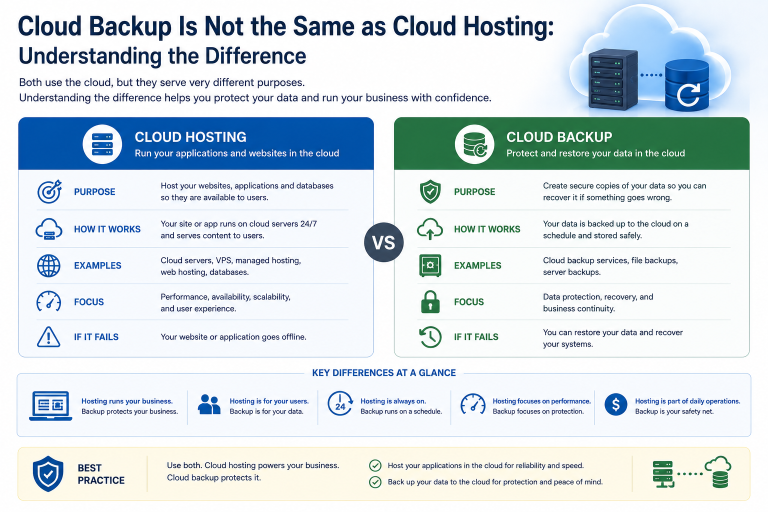
Backup preserves copies of data.
Disaster recovery defines how the complete service will be restored.
A backup may contain files, databases or a server image, but the business may still need to:
- Provision replacement infrastructure.
- Configure networking and security.
- Restore the operating system.
- Recover applications.
- Restore data.
- Test the environment.
- Redirect users.
- confirm that normal operations can resume.
A business can therefore have valid backups and still face a lengthy outage.
The recovery plan must address infrastructure, applications, access, dependencies and decision-making—not only stored data.
Define the Recovery Time Objective
The recovery time objective, or RTO, is the maximum acceptable period that a system can remain unavailable.
Different services may require different targets.
For example:
- A customer ordering platform may require recovery within one hour.
- An internal file archive may tolerate one business day.
- A development environment may tolerate several days.
A shorter recovery objective normally requires more preparation and higher cost.
Fast recovery may depend on:
- Preconfigured standby infrastructure
- Automated failover
- Replicated data
- Reserved cloud capacity
- Continuous monitoring
- Immediate technical support
A system that can tolerate longer downtime may be restored from conventional backup after replacement infrastructure is prepared.
Define the Recovery Point Objective
The recovery point objective, or RPO, describes how much recent data the business can afford to lose.
If backups run every 24 hours, the business may lose almost one day of data after an incident.
If data is replicated every few minutes, the potential loss may be much smaller.
The appropriate RPO depends on:
- Transaction volume
- Frequency of data changes
- Ability to recreate lost work
- Legal obligations
- Customer expectations
- Cost of missing information
A static information website may tolerate a longer RPO than an active financial, ordering or customer-management system.
RTO and RPO Must Be Considered Together
A business may have frequent backups but still require many hours to restore them.
Another system may fail over quickly but replicate corrupted data immediately.
RTO and RPO address different questions:
| Measure | Main Question |
|---|---|
| Recovery time objective | How long can the service remain unavailable? |
| Recovery point objective | How much recent data can be lost? |
Both targets should be defined for each important workload.
They should also be realistic. Requesting near-zero downtime and near-zero data loss can increase infrastructure and management costs significantly.
Identify Critical Business Systems
Not every system needs the same recovery priority.
Create a list of applications and classify them according to business impact.
Consider:
- Customer-facing systems
- Financial applications
- Databases
- Communication platforms
- File services
- Manufacturing or operational systems
- Websites
- Identity services
- Backup management systems
- Internal reporting tools
For each system, record:
- Business owner
- Technical owner
- Maximum acceptable downtime
- Maximum acceptable data loss
- Dependencies
- Recovery method
- Recovery order
This prevents less important systems from consuming time and resources before critical services are restored.
Understand Application Dependencies
A business application rarely operates alone.
It may depend on:
- Database servers
- Authentication services
- DNS
- Storage
- Network connectivity
- Third-party APIs
- Email services
- Security certificates
- Licence servers
- External software providers
Restoring only the application server may not return the service to operation.
The recovery plan should show how components connect and which systems must be restored first.
Dependency mapping is particularly important in hybrid environments where some systems remain on-premises and others operate in the cloud.
Choose the Appropriate Recovery Model
Cloud disaster recovery can be designed at several levels.
Backup and Restore
The business stores backups in the cloud and creates replacement infrastructure only after an incident.
This is usually the least expensive option, but it often provides the longest recovery time.
It may be suitable when:
- Several hours or days of downtime are acceptable
- Workloads are not critical
- Infrastructure can be rebuilt easily
- Cost is the main constraint
Recovery speed depends on data volume, network bandwidth and the availability of replacement resources.
Pilot-Light Recovery
A pilot-light environment keeps essential components running in the cloud while larger resources remain inactive.
For example, the business may maintain a replicated database and basic networking, then deploy application servers when recovery is required.
This can reduce recovery time without paying continuously for a complete secondary environment.
It still requires tested procedures and automation to start the remaining services.
Warm Standby
A warm standby environment maintains a smaller but operational version of the production system.
During an incident, the standby environment is expanded and users are redirected to it.
This approach can provide faster recovery than backup and restore.
However, it creates ongoing costs for:
- Standby compute
- Replication
- Storage
- Monitoring
- Security
- Maintenance
The standby system must also be updated whenever the production environment changes.
Active-Active Recovery
An active-active architecture operates in two or more locations simultaneously.
Traffic is distributed between environments, and one location can continue operating if another fails.
This can provide very short recovery times, but it is usually the most complex and expensive model.
It may require:
- Multi-region applications
- Synchronous or near-synchronous data replication
- Global traffic management
- Automated failover
- Conflict handling
- Continuous monitoring
- Consistent security controls
Active-active infrastructure is normally justified only when the cost of downtime is very high.
Select the Recovery Region Carefully
A recovery environment should be separate enough from the primary infrastructure to reduce shared risk.
Using another availability zone may protect against failure of one facility.
Using another cloud region may provide protection against a wider regional incident.
Using another provider can reduce dependence on one platform but creates more complexity.
Consider whether the primary and recovery environments share:
- Power infrastructure
- Network routes
- Identity services
- Administrative accounts
- Storage systems
- Cloud regions
- Provider management platforms
Greater separation can improve resilience, but it may also increase transfer costs, management effort and recovery complexity.
Protect Against Cyber Incidents
Disaster recovery plans must consider more than hardware or provider outages.
Ransomware and account compromise can affect:
- Production servers
- Replicated data
- Backups
- Cloud administration accounts
- Recovery environments
If corrupted or encrypted data is replicated immediately, the standby environment may also become unusable.
Protection may include:
- Immutable backups
- Separate administrative credentials
- Multi-factor authentication
- Restricted deletion permissions
- Offline recovery copies
- Delayed replication
- Security monitoring
- Clean recovery environments
The business should be able to restore from a point before the incident began.
Include Network and DNS Recovery
Users must be able to reach the restored service.
Recovery may require changes to:
- DNS records
- Public IP addresses
- VPN connections
- Firewall rules
- Load balancers
- Routing
- Access-control lists
- Private network connections
These changes should be documented and tested.
DNS settings may also need appropriately planned time-to-live values so that traffic can be redirected within the required period.
A restored application is not operational if employees or customers cannot connect to it.
Consider Data Volume and Restore Speed
Large backups may take a long time to restore.
Recovery speed depends on:
- Total protected data
- Backup storage performance
- Network bandwidth
- Number of files
- Database size
- Compression
- Encryption
- Provider limits
- Available compute capacity
Restoring five terabytes is very different from restoring a small application server.
The business should estimate recovery time using actual tests rather than relying only on theoretical network speeds.
Large datasets may require replication, standby storage or provider-assisted recovery to meet a short RTO.
Ensure Replacement Capacity Is Available
Cloud capacity is flexible, but it is not unlimited in every region.
During a widespread incident, many customers may attempt to deploy resources simultaneously.
The required server type may also be unavailable because of:
- Regional capacity limits
- Specialist processors
- Large memory requirements
- Graphics processors
- Dedicated hardware
- Storage constraints
For critical workloads, consider:
- Reserved capacity
- Alternative server types
- A secondary region
- Smaller temporary configurations
- Infrastructure templates supporting several options
A recovery plan should not depend entirely on one exact virtual-machine type being immediately available.
Use Infrastructure Automation
Manual rebuilding increases recovery time and the risk of errors.
Infrastructure automation can recreate:
- Virtual machines
- Networks
- Firewall rules
- Load balancers
- Storage
- User permissions
- Monitoring
- Security policies
Deployment templates should be stored securely and updated whenever the production environment changes.
Automation can reduce recovery time, but it must be tested.
An outdated template may deploy an environment that no longer matches the application or security requirements.
Document the Recovery Procedure
A recovery plan should provide clear, practical steps.
It should identify:
- Who declares a disaster
- Who contacts the provider
- Which system is restored first
- Which backups are used
- How infrastructure is deployed
- How data is validated
- How users are redirected
- Who approves return to service
- How stakeholders are informed
- How the primary environment is restored later
The procedure should be usable during a high-pressure incident.
Avoid relying on undocumented knowledge held by one employee or supplier.
Assign Clear Responsibilities
Cloud disaster recovery usually involves several parties.
These may include:
- Internal IT
- Cloud provider
- Managed-service provider
- Application vendor
- Internet provider
- Security team
- Business management
The plan should state who is responsible for:
- Monitoring
- Incident assessment
- Backup verification
- Infrastructure deployment
- Application recovery
- Communication
- Security investigation
- Final approval
Unclear responsibility can delay recovery even when the technical tools are available.
Test the Recovery Plan
A disaster recovery plan that has never been tested is only an assumption.
Testing can identify:
- Missing backups
- Incorrect credentials
- Incomplete documentation
- Slow restoration
- Unsupported software
- Network problems
- Application dependencies
- DNS delays
- Insufficient cloud capacity
Tests may include:
- Restoring individual files
- Recovering a database
- Starting a virtual machine from backup
- Running an application in the recovery region
- Redirecting test traffic
- Conducting a full recovery exercise
The level of testing should reflect the importance of the workload.
Measure Actual Recovery Time
During testing, record the time required for each stage.
For example:
| Recovery Stage | Time Required |
|---|---|
| Detect and confirm incident | 20 minutes |
| Approve disaster declaration | 15 minutes |
| Deploy replacement infrastructure | 30 minutes |
| Restore data | 2 hours |
| Test application | 45 minutes |
| Redirect users | 15 minutes |
The total measured recovery time can then be compared with the required RTO.
Testing often reveals that decision-making, validation and communication take as long as the technical restoration.
Test More Than Successful Backup Completion
A backup report showing success does not prove that the business can recover.
A complete test should confirm that:
- Data can be restored
- Applications start correctly
- Users can authenticate
- Integrations work
- Security controls remain active
- Performance is acceptable
- Recent transactions are present
- The recovery procedure is understood
The business should also verify that the restored environment is clean and not affected by the original incident.
Review the Plan After Changes
Disaster recovery documentation becomes outdated when the infrastructure changes.
Review the plan after:
- Application upgrades
- Cloud migrations
- New server deployments
- Network changes
- Staff changes
- Provider changes
- Security incidents
- Backup-policy changes
- Business acquisitions
A plan designed for last year’s environment may not recover today’s systems successfully.
Schedule regular reviews even when no major change is reported.
Include Communication in the Recovery Plan
Technical recovery is only one part of incident management.
The business may need to communicate with:
- Employees
- Customers
- Suppliers
- Management
- Regulators
- Insurance providers
- Legal advisers
Prepare communication responsibilities and contact information in advance.
Messages should explain what is known, which services are affected and when another update will be provided.
Poor communication can increase business impact even when systems are being restored correctly.
Estimate the Cost of Downtime
Recovery investment should reflect the financial and operational impact of an outage.
Consider:
- Lost sales
- Employee downtime
- Missed transactions
- Customer-service disruption
- Recovery labour
- Contractual penalties
- Reputational damage
- Regulatory exposure
A system causing little business impact may not justify an expensive warm standby.
A critical revenue or operational platform may justify substantial recovery investment.
The appropriate disaster recovery model should be based on business impact rather than technology preference.
Compare Recovery Cost With Business Risk
Disaster recovery costs may include:
- Backup storage
- Replication traffic
- Standby servers
- Secondary-region resources
- Software licences
- Monitoring
- Managed support
- Recovery testing
- Documentation
- Staff training
The lowest-cost recovery method normally produces the longest recovery time.
The business must decide how much it is prepared to invest to reduce downtime and data loss.
This decision should be made by business management together with technical teams.
Common Disaster Recovery Mistakes
Assuming Cloud Hosting Cannot Fail
Cloud services can still experience regional, network, software and configuration failures.
Treating Backup as a Complete Recovery Plan
Data may be available while infrastructure, applications and access remain unavailable.
Using the Same Credentials Everywhere
A compromised administrator account may affect production and recovery systems.
Replicating Corruption Immediately
Replication can copy ransomware, deletion and application errors.
Ignoring Application Dependencies
A restored server may remain unusable without its database, identity system or external integrations.
Never Testing Full Recovery
Individual file restores do not prove that the complete service can return to operation.
Setting Unrealistic Recovery Targets
Very short RTO and RPO targets require suitable architecture, cost and operational readiness.
Failing to Update Documentation
Recovery procedures quickly become unreliable when systems change.
A Practical Cloud Disaster Recovery Checklist
Before approving a recovery plan, ask:
- Which systems are business-critical?
- What is the RTO for each system?
- What is the RPO for each system?
- Which applications depend on other services?
- Where are backups stored?
- Are any backup copies immutable?
- Is the recovery environment in another zone or region?
- Can replacement infrastructure be deployed automatically?
- Is cloud capacity available during an incident?
- Who declares a disaster?
- Who performs each recovery task?
- How will users reach the restored service?
- How long does a complete restore actually take?
- Has the application been tested in the recovery environment?
- Are security controls maintained during recovery?
- How often is the plan tested?
- When was the documentation last updated?
- How will employees and customers be informed?
A credible disaster recovery plan should provide documented answers to these questions.
Final Recommendation
Start by identifying critical systems and defining how much downtime and data loss the business can tolerate.
Use backup and restore for workloads that can remain unavailable for longer periods. Consider pilot-light or warm-standby infrastructure when faster recovery is required. Reserve active-active architecture for systems where very short interruption creates significant business impact.
Keep recovery copies and administrative access sufficiently separate from production. Automate repeatable tasks, document every dependency and test the complete recovery process regularly.
The speed of recovery should be measured through testing rather than assumed from a provider’s service description.
Ila Express provides cloud backup, disaster recovery, standby infrastructure, replication and managed recovery services for business systems.
Contact Ila Express to assess your current recovery capability and design a cloud disaster recovery plan around your required recovery time and data-loss tolerance.