Replacing business technology too early wastes money and creates unnecessary electronic waste.
Keeping it for too long can create a different set of problems, including unreliable equipment, unsupported software, security exposure, poor performance and difficult recovery after failure.
The objective should not be to keep every computer, server or network device for as many years as possible.
A better objective is to extend the useful life of equipment while it remains secure, supportable, capable of meeting the workload and economical to maintain.
With good asset records, preventive maintenance, targeted upgrades and clear replacement criteria, many businesses can delay unnecessary purchases without increasing operational risk.
Useful Life Is Not the Same as Maximum Life
A device may continue powering on long after it has stopped being suitable for business use.
Its useful life depends on whether it can still provide:
- Acceptable performance
- Supported software
- Reliable operation
- Required security controls
- Available replacement parts
- Practical warranty or repair
- Compatibility with current systems
- Reasonable energy efficiency
A ten-year-old computer may remain technically functional but take too long to complete ordinary work.
A server may run reliably while its operating system is no longer supported.
Equipment should therefore be evaluated by business suitability rather than age alone.
Start With an Accurate Asset Register
It is difficult to manage hardware lifecycle without knowing what the business owns.
The asset register should record:
- Device type
- Manufacturer
- Model
- Serial number
- Asset tag
- User or location
- Purchase date
- Warranty status
- Processor and memory
- Storage configuration
- Operating system
- Business role
- Replacement priority
For servers and network equipment, also record:
- Firmware version
- Support contract
- Rack location
- Power-supply configuration
- Management address
- Key dependencies
A reliable inventory allows the business to plan upgrades and replacements before equipment becomes urgent.
Classify Equipment by Business Importance
Not every device creates the same risk when it fails.
A practical classification may include:
Critical Infrastructure
Examples include:
- Production servers
- Core network switches
- Firewalls
- Backup appliances
- Storage systems
- Authentication services
These systems usually require stronger support, redundancy and replacement planning.
Important Business Equipment
Examples include:
- Employee computers
- Departmental switches
- Wireless access points
- Secondary servers
- Shared printers
These devices affect productivity but may have temporary workarounds.
Non-Critical or Secondary Equipment
Examples include:
- Test systems
- Training computers
- Spare devices
- Lab equipment
- Temporary project hardware
These systems can often remain in service longer if their failure creates little operational impact.
Lifecycle decisions should reflect business importance, not only technical age.
Measure Performance Before Replacing
A slow device does not always require complete replacement.
Performance problems may come from:
- Insufficient memory
- Mechanical hard drive
- Full storage
- Excessive startup software
- Outdated operating system
- Malware
- Poor cooling
- Failing drive
- Network limitations
- Application design
Measure the actual bottleneck before buying new equipment.
A modest upgrade may extend useful life by several years.
Upgrade Memory Where It Solves a Real Problem
Insufficient memory can make a computer or server slow even when the processor remains suitable.
Common symptoms include:
- Frequent disk activity
- Delayed application switching
- Slow virtual machines
- Poor browser performance
- Database slowdown
- Application crashes
Adding memory can be cost-effective when:
- The system supports additional capacity
- Suitable modules remain available
- The processor is still adequate
- The operating system remains supported
- Storage is not the main bottleneck
Before upgrading, confirm:
- Supported memory type
- Maximum capacity
- Free slots
- Channel configuration
- Firmware compatibility
Avoid installing incompatible or poorly matched modules.
Replace HDDs With SSDs
Replacing a mechanical hard drive with an SSD can significantly improve an older business computer.
Potential improvements include:
- Faster startup
- Faster application loading
- Better responsiveness
- Lower noise
- Lower power use
- Better resistance to movement
This upgrade is often worthwhile when the computer has:
- A suitable processor
- Enough or upgradeable memory
- A supported operating system
- No other major hardware problems
The SSD should provide appropriate capacity, endurance and warranty.
The original drive should be sanitised or retained securely after migration.
Do Not Upgrade Around an Unsupported Platform
Targeted upgrades are useful only when the underlying system remains viable.
Replacing memory and storage may not be sensible when the equipment has:
- Unsupported operating-system requirements
- Obsolete processor architecture
- No security-module support
- Incompatible firmware
- Unavailable drivers
- Failing motherboard
- Limited application compatibility
A low-cost upgrade can become wasted spending if the complete device still needs replacement shortly afterwards.
Review platform support before investing.
Keep Operating Systems Supported
Security support is one of the most important lifecycle limits.
An operating system that no longer receives updates may expose the business to:
- Unpatched vulnerabilities
- Application incompatibility
- Compliance problems
- Unsupported security tools
- Supplier refusal to assist
- Increased incident risk
Before extending hardware life, confirm that it can run a supported operating system effectively.
The system should also meet the requirements of current applications and security software.
Review Application Compatibility
A device may remain technically capable while the business applications have moved beyond it.
Check whether the equipment supports:
- Current application versions
- Current browser versions
- Database requirements
- Security software
- Drivers
- Remote-management tools
- Collaboration platforms
A server that cannot run a supported application version may create more risk than value.
Lifecycle planning should consider software roadmaps as well as hardware condition.
Maintain Firmware
Servers, storage, switches and other devices contain firmware that can affect reliability and security.
Review firmware for:
- System BIOS
- Storage controllers
- Network adapters
- Management controllers
- SSDs and HDDs
- Switches
- Firewalls
- Wireless access points
Firmware updates may correct:
- Security vulnerabilities
- Stability problems
- Compatibility issues
- Performance defects
- Hardware-management errors
Updates should be tested and scheduled carefully for important systems.
Do not update firmware casually without backup, documentation and a rollback plan.
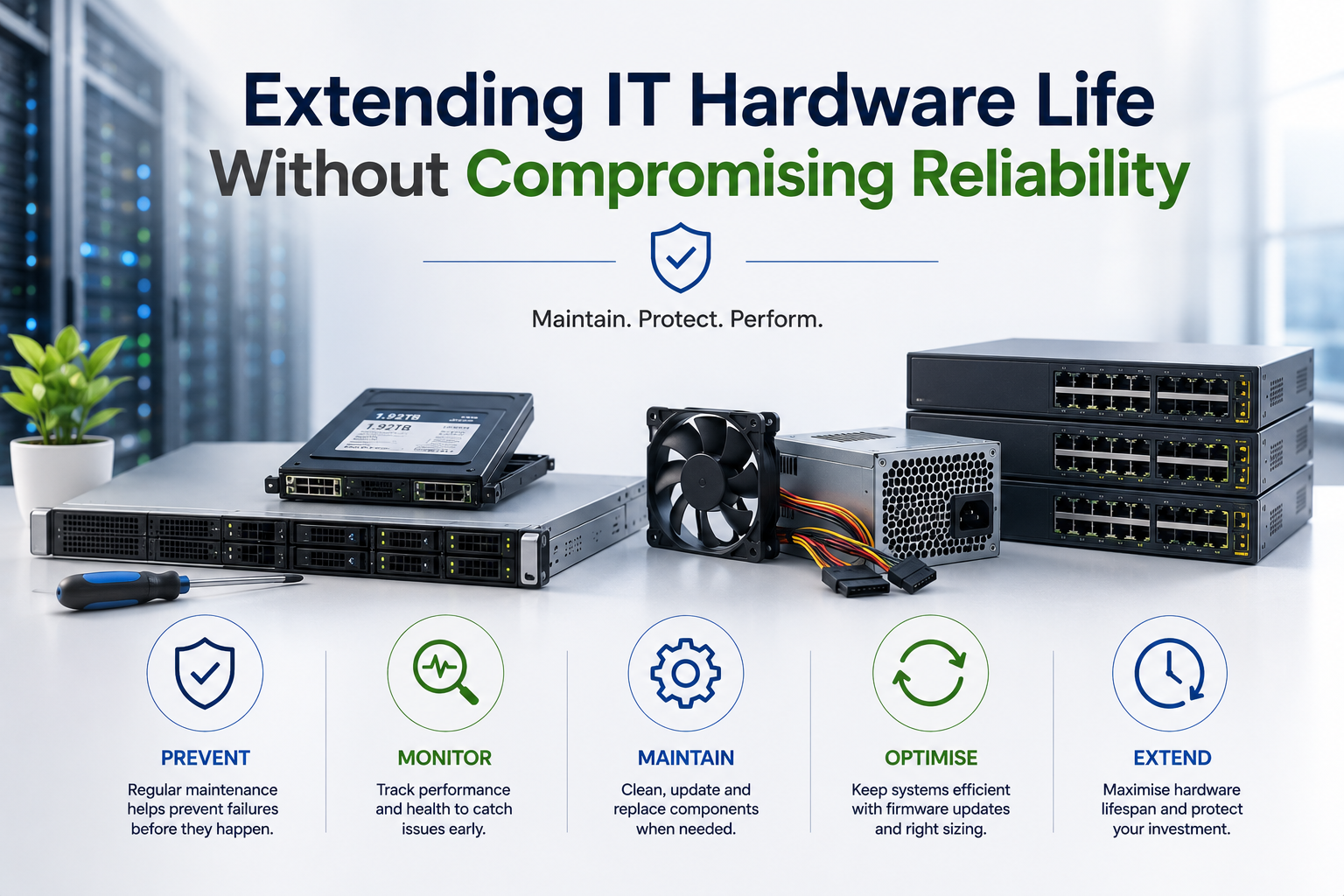
Use Preventive Maintenance
Preventive maintenance can reduce avoidable failures.
Tasks may include:
- Cleaning dust
- Checking airflow
- Inspecting fans
- Reviewing temperatures
- Testing UPS batteries
- Checking drive health
- Inspecting cables
- Updating firmware
- Reviewing hardware alerts
- Confirming backup operation
For server rooms, also review:
- Cooling
- Humidity
- Power quality
- Rack airflow
- Water risk
- Physical security
Maintenance frequency should reflect the environment and business importance of the equipment.
Keep Equipment Clean
Dust can block airflow and increase temperature.
Excess heat can reduce hardware life and cause:
- Fan failure
- Processor throttling
- Unexpected shutdown
- Drive problems
- Power-supply stress
Cleaning should follow safe procedures.
Before opening equipment:
- Shut it down where required
- Disconnect power
- Use appropriate antistatic precautions
- Avoid uncontrolled compressed air
- Protect fans from overspeed
- Follow manufacturer guidance
High-density servers and switches may require cleaning in a controlled maintenance window.
Monitor Temperature
Temperature monitoring can identify cooling problems before equipment fails.
Review:
- Processor temperature
- Drive temperature
- System-board temperature
- Fan speed
- Rack inlet temperature
- Room temperature
A device operating within its maximum specification may still be running hotter than normal.
Changes over time can indicate:
- Dust
- Fan degradation
- Blocked airflow
- Cooling failure
- Excess workload
- Poor equipment placement
Monitoring trends is often more useful than checking one reading.
Review Drive Health
Storage devices are common points of failure.
Monitor:
- Predictive drive warnings
- Read and write errors
- SSD endurance
- RAID condition
- Reallocated sectors
- Controller alerts
- Rebuild status
A drive may continue operating after early warning signs appear.
For critical systems, replace questionable drives before complete failure where the evidence and vendor guidance support it.
Always confirm that current backups exist before storage maintenance.
Replace Batteries Before Failure
Business equipment may contain batteries in:
- UPS systems
- RAID controllers
- Cache modules
- Servers
- Laptops
- Network devices
- Backup appliances
Batteries degrade with age, temperature and use.
A failed UPS battery may provide no meaningful runtime during an outage.
A degraded cache-protection battery may reduce storage performance or affect safe write caching.
Test batteries regularly and replace them according to condition and manufacturer guidance.
Protect Equipment With Stable Power
Poor power quality can shorten hardware life.
Use suitable protection such as:
- UPS systems
- Surge protection
- Correct grounding
- Redundant power feeds
- Monitored power distribution
- Proper circuit capacity
Critical servers and network equipment should not depend on one unprotected office socket.
The UPS should be monitored and sized for the actual load.
Runtime requirements should be based on the time needed for controlled shutdown or generator startup.
Maintain Adequate Cooling and Ventilation
Hardware lasts longer when it operates in a suitable environment.
Avoid placing important equipment in:
- Closed cupboards
- Hot ceiling spaces
- Dusty storage rooms
- Areas near water
- Unventilated cabinets
- Spaces with direct sunlight
Switches and servers may require front-to-back airflow.
Mixing equipment with different airflow directions can create hot spots.
Environmental suitability is part of lifecycle management.
Keep Spare Parts for Critical Legacy Systems
Older systems may remain reliable while replacement parts become harder to obtain.
For business-critical legacy equipment, consider keeping:
- Spare power supply
- Compatible drive
- Fan
- Network adapter
- RAID controller
- Memory module
- Complete standby unit
Spares should be tested and stored appropriately.
Keeping a spare component can reduce downtime, but it should not justify operating an unsupported platform indefinitely.
Use Standardised Hardware
Standardisation simplifies lifecycle extension.
Benefits can include:
- Interchangeable parts
- Fewer driver variations
- Easier imaging
- Consistent support procedures
- Simplified stock of spares
- Better technician familiarity
A business with many unrelated device models may spend more time sourcing components and troubleshooting unique problems.
Standardisation does not require every user to receive identical equipment, but the number of supported platforms should remain manageable.
Reassign Equipment to Less Demanding Roles
Hardware that is no longer suitable for one user may remain useful elsewhere.
For example:
- High-performance workstation becomes a standard office computer
- Production server becomes a test server
- Main switch becomes a lab or spare switch
- Older laptop becomes a temporary loan device
- Storage server becomes a secondary archive system
Reassignment can extend value while reducing risk.
Before reuse:
- Test the equipment
- Update firmware
- Install a supported operating system
- Sanitise previous data where appropriate
- Update the asset register
- Adjust support expectations
Do not move unreliable equipment into another critical role.
Use Older Hardware for Testing and Training
Retired production equipment can be useful for:
- Software testing
- Technical training
- Recovery exercises
- Development
- Demonstrations
- Spare capacity
This keeps non-production work away from critical systems.
However, old equipment should remain isolated and secured if it cannot run current software safely.
A test environment should not become an uncontrolled route into the production network.
Consider Refurbished Replacement Parts
Refurbished enterprise components can help extend supported equipment economically.
Examples include:
- Memory
- Power supplies
- Drive carriers
- Network adapters
- RAID controllers
- Complete replacement servers
Use reputable suppliers that provide:
- Testing
- Clear specifications
- Warranty
- Compatibility advice
- Secure packaging
- Traceable serial numbers
For critical storage, new drives may still be preferable.
The appropriate choice depends on component type, condition and business impact.
Maintain Warranty Where It Provides Value
Extended warranty can reduce risk for important equipment.
It may include:
- Parts replacement
- On-site service
- Defined response time
- Technical support
- Firmware access
Warranty is particularly valuable when:
- Replacement parts are expensive
- Internal repair capability is limited
- Downtime has high impact
- The equipment remains central to operations
However, extending warranty on very old hardware may become expensive or unavailable.
Compare warranty cost with replacement cost and remaining useful life.
Use Third-Party Maintenance Carefully
Third-party maintenance can support equipment after the manufacturer’s standard support period.
It may provide:
- Replacement parts
- On-site repair
- Remote technical support
- Flexible contract terms
- Multi-vendor coverage
Before using it, confirm:
- Response times
- Geographic coverage
- Parts availability
- Engineer capability
- Firmware access
- Exclusions
- Escalation process
Third-party maintenance can extend useful life but may not solve software-certification or security-support limits.
Monitor Reliability Trends
Do not wait for complete failure before reviewing ageing equipment.
Track:
- Support incidents
- Drive replacements
- Memory errors
- Fan failures
- Unexpected restarts
- Performance complaints
- Repair cost
- Downtime
- Parts availability
One minor fault may not justify replacement.
A pattern of increasing incidents can show that the equipment is reaching the end of economical life.
Lifecycle decisions should use evidence rather than habit.
Calculate the Cost of Keeping Old Hardware
Extending hardware life is not automatically cheaper.
Include:
- Repair cost
- Staff time
- Downtime
- Energy use
- Support contracts
- Replacement parts
- Performance loss
- Security risk
- Lost productivity
An older server may avoid a capital purchase while consuming more electricity and requiring more support.
An older employee computer may cost little to keep but waste several hours of user time every month.
The correct comparison is total lifecycle cost, not current book value.
Consider Energy Efficiency
Newer hardware may perform more work using less power.
Energy savings can matter for:
- Servers operating continuously
- Storage arrays
- Network switches
- High-power workstations
- Large device fleets
Compare:
- Average power use
- Cooling requirement
- UPS capacity
- Performance per watt
- Annual operating hours
Replacing one office computer solely for energy savings may not be justified.
Replacing several inefficient servers with a smaller modern virtualisation platform may produce meaningful savings.
Review Software-Licence Costs
Older hardware can increase software cost.
For example:
- More processor cores may require more licences
- Old virtualisation platforms may need extended support
- Legacy operating systems may require special agreements
- Separate physical servers may need more software instances
A newer consolidated platform may reduce hardware count and software complexity.
The lifecycle decision should consider both equipment and licences.
Consolidate Where Appropriate
Several underused physical servers may be consolidated onto a supported virtualisation platform.
Potential benefits include:
- Reduced hardware count
- Lower power use
- Easier backup
- Better resource use
- Simplified recovery
- Reduced rack space
Consolidation creates concentration risk.
The host platform may need:
- Redundant storage
- Reliable backup
- Sufficient memory
- High availability
- Strong support
Do not consolidate critical systems onto one poorly protected server.
Avoid Unsupported Security Devices
Firewalls, switches, wireless access points and remote-management platforms may remain functional after support ends.
However, unsupported network equipment may no longer receive:
- Security updates
- Vulnerability fixes
- Current encryption support
- Vendor assistance
- Compatibility updates
Security infrastructure should generally receive stricter lifecycle treatment than low-risk peripheral equipment.
A functioning unsupported firewall can present greater risk than an older standalone printer.
Replace Equipment That Cannot Support Required Security
Hardware should be replaced when it cannot support controls the business reasonably needs.
Examples include:
- Multi-factor authentication integration
- Supported encryption
- Secure Boot
- Current TLS versions
- Modern Wi-Fi security
- Supported endpoint protection
- Current operating system
- Secure remote management
The business should not weaken its security standard merely to preserve old equipment.
Back Up Before Major Hardware Work
Upgrades and maintenance introduce risk.
Before replacing memory, drives, controllers or firmware:
- Confirm backups completed
- Test access to recovery copies
- Record current configuration
- Document cable and drive positions
- Prepare rollback steps
- Confirm spare parts
- Schedule an appropriate window
Even routine maintenance can cause unexpected failure in ageing hardware.
Recovery readiness is essential.
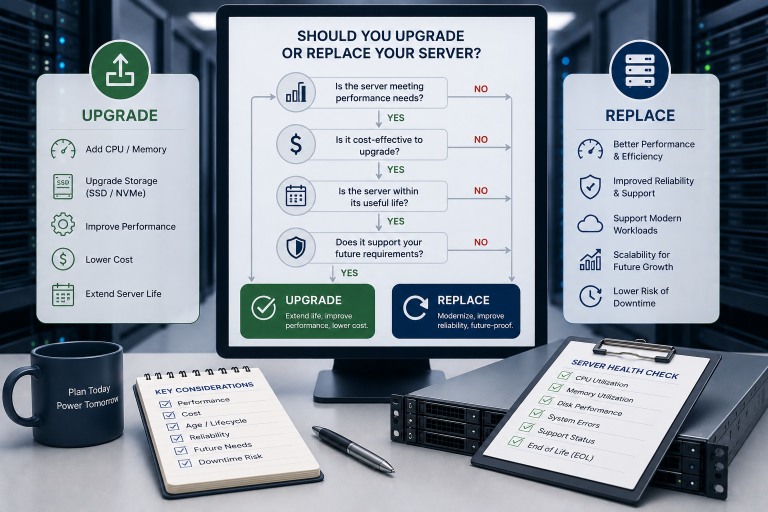
Use Condition-Based Replacement
A fixed replacement cycle can simplify planning, but age alone should not always determine replacement.
Condition-based decisions consider:
- Performance
- Reliability
- Support status
- Security
- Repair history
- Workload fit
- Parts availability
- Total operating cost
This may allow some equipment to remain longer while replacing higher-risk devices earlier.
A mixed approach often works best: planned lifecycle targets combined with annual condition review.
Set Replacement Triggers
Define clear conditions that require replacement.
Possible triggers include:
- Manufacturer support has ended
- Operating system cannot be upgraded
- Failure frequency is increasing
- Parts are unavailable
- Performance no longer meets requirements
- Warranty cost is excessive
- Security controls cannot be supported
- Energy and maintenance cost exceed replacement value
- Recovery after failure would take too long
Documented triggers reduce emotional or inconsistent purchasing decisions.
Plan Replacement Before Failure
Emergency replacement usually costs more and creates greater risk.
Problems may include:
- Limited supplier choice
- Expedited shipping
- Unplanned downtime
- Poor configuration
- Missing migration time
- Inadequate testing
- Budget disruption
Maintain a rolling replacement forecast showing equipment expected to need action during the next one to three years.
This gives management time to budget and compare options.
Keep a Small Pool of Spare Devices
A spare pool can reduce employee downtime after device failure.
It may include:
- Prepared laptops
- Standard desktops
- Power adapters
- Docks
- Monitors
- Key network components
Spare devices should be:
- Tested
- Updated
- Securely stored
- Recorded in inventory
- Ready for deployment
Very old, unpatched equipment should not be considered a useful spare.
Use Remote Monitoring
Remote monitoring can extend hardware life by detecting problems early.
Monitoring may cover:
- Temperature
- Disk health
- Memory errors
- Power supplies
- Fans
- Storage capacity
- Battery condition
- Network ports
- Device availability
Alerts should be reviewed by a responsible person.
Monitoring without response merely records the failure more accurately.
Maintain Good Documentation
Older equipment is easier to support when documentation remains current.
Record:
- Configuration
- Firmware
- Network settings
- Drive layout
- Licence information
- Administrator access
- Backup process
- Replacement parts
- Recovery procedure
Documentation reduces dependence on one employee or supplier.
It also speeds replacement when the equipment finally reaches end of life.
Keep Recovery Options Current
Equipment can be retained longer when the business can recover quickly after failure.
Recovery options may include:
- Current backups
- Complete system images
- Spare hardware
- Cloud recovery
- Virtual-machine replication
- Documented rebuild procedures
- Replacement supplier agreements
A well-protected older server may present less business risk than a newer server with no tested recovery plan.
Reliability should be evaluated at the service level, not only the device level.
Do Not Confuse Redundancy With Backup
Older servers may have:
- RAID
- Redundant power
- Multiple network ports
- Spare drives
These features can reduce downtime after component failure.
They do not replace independent backup.
Ransomware, deletion, corruption, theft and complete server loss can affect the live system regardless of its internal redundancy.
Extend Life Through Hybrid Infrastructure
A business may reduce demand on ageing local hardware by moving selected services to the cloud.
Examples include:
- Cloud backup
- Hosted email
- Public website hosting
- Cloud archive storage
- Temporary computing
- Disaster recovery
This can allow the remaining physical infrastructure to focus on local workloads.
The hybrid design should still be reviewed for cost, security and connectivity.
Replace Only the Component That Creates the Bottleneck
A complete replacement may be unnecessary when one component limits the system.
Examples include:
- Add memory to support more applications
- Replace HDD with SSD
- Upgrade network adapter
- Replace degraded battery
- Add faster storage
- Replace failed fan
- Upgrade switch uplink
This approach can be cost-effective when the platform remains supported.
Avoid excessive upgrades that approach the cost of a newer replacement without extending support life.
Consider Warranty, Support and Recovery Together
Reliability is not determined only by failure probability.
It also depends on how quickly the business can respond.
A device may remain acceptable when:
- Replacement parts are available
- Support is responsive
- Backup is current
- Spare equipment exists
- Recovery is tested
The same device may be unacceptable when:
- It is the only system
- No spare parts exist
- Backup is untested
- Downtime would be severe
- Knowledge is undocumented
Lifecycle decisions should consider recovery capability.
End-of-Life Data Protection
When equipment is finally retired, business data must be sanitised securely.
The process may require:
- Verified software erasure
- Cryptographic erase
- Secure device reset
- Physical destruction
- Certificate of erasure
- Chain-of-custody records
Deleting files or reinstalling the operating system may not be sufficient.
Plan sanitisation before resale, return or recycling.
Reuse and Resale
Equipment that no longer fits the business may still have value.
Possible outcomes include:
- Internal reassignment
- Trade-in
- Resale
- Donation
- Parts recovery
- Recycling
Before release:
- Remove business data
- Remove accounts and keys
- Reset management interfaces
- Remove asset labels
- Record serial numbers
- Update the asset register
- Verify the final destination
Responsible reuse can recover value and reduce waste.
Common Lifecycle Mistakes
Replacing Equipment Only Because of Age
Some older devices remain secure, supported and suitable.
Keeping Equipment Until It Fails
Emergency replacement increases cost and downtime.
Upgrading Unsupported Platforms
New memory or SSDs do not solve software and security limitations.
Ignoring Power and Cooling Costs
Low-value older equipment may remain expensive to operate.
Treating Every Device the Same
Critical infrastructure needs stricter lifecycle controls than test equipment.
Failing to Monitor Reliability Trends
Repeated minor faults can indicate an approaching major problem.
Keeping Old Equipment as Unusable Spares
A spare must be secure, tested and compatible.
Disposing of Equipment Without Sanitisation
Retired hardware may still contain recoverable business information.
A Practical Hardware-Life Extension Checklist
Before extending the life of a device, ask:
- Does it still meet the business workload?
- Is the operating system supported?
- Are applications and security tools compatible?
- Is manufacturer or third-party support available?
- Are replacement parts obtainable?
- Has reliability remained acceptable?
- Are hardware alerts being monitored?
- Would memory or SSD upgrades solve the main problem?
- Is the upgrade cost reasonable compared with replacement?
- Is energy use acceptable?
- Can the equipment support required security controls?
- Is backup current and tested?
- Is spare equipment available?
- Is the recovery procedure documented?
- What is the cost of expected downtime?
- Has a replacement trigger been defined?
- Is the equipment included in the future budget plan?
- Can it be reassigned safely when removed from its current role?
A positive answer to most of these questions supports a controlled life extension.
Final Recommendation
Extend IT hardware life when the equipment remains secure, supported, reliable and capable of meeting the workload.
Use targeted upgrades such as additional memory, SSD storage, replacement batteries and faster network adapters where they solve a measured problem. Maintain firmware, cooling, power protection and hardware monitoring so faults can be identified early.
Do not continue investing in equipment that cannot run supported software, meet required security controls or recover within an acceptable period after failure.
Classify assets by business importance, define replacement triggers and maintain a rolling budget forecast. Keep tested backups, suitable spare equipment and documented recovery procedures for systems that remain in service beyond their original lifecycle.
The goal is not to maximise equipment age. It is to obtain full business value without allowing ageing hardware to create unnecessary operational risk.
Ila Express supplies business computers, servers, storage, networking components and tested refurbished hardware, together with upgrades, maintenance and lifecycle services.
Contact Ila Express to review your existing equipment and identify which systems can be upgraded, reassigned or retained safely—and which should be replaced before reliability becomes a business problem.