Cloud hosting quotations often highlight processor capacity, memory, storage and the base monthly server price.
Network traffic may receive much less attention.
A cloud server can appear affordable until the business begins moving large amounts of data to users, offices, backup locations or other cloud regions. Depending on the provider, these transfers may be included within a monthly allowance, limited by bandwidth or charged separately as egress.
Understanding the terminology helps buyers compare hosting offers more accurately and avoid unexpected costs after deployment.
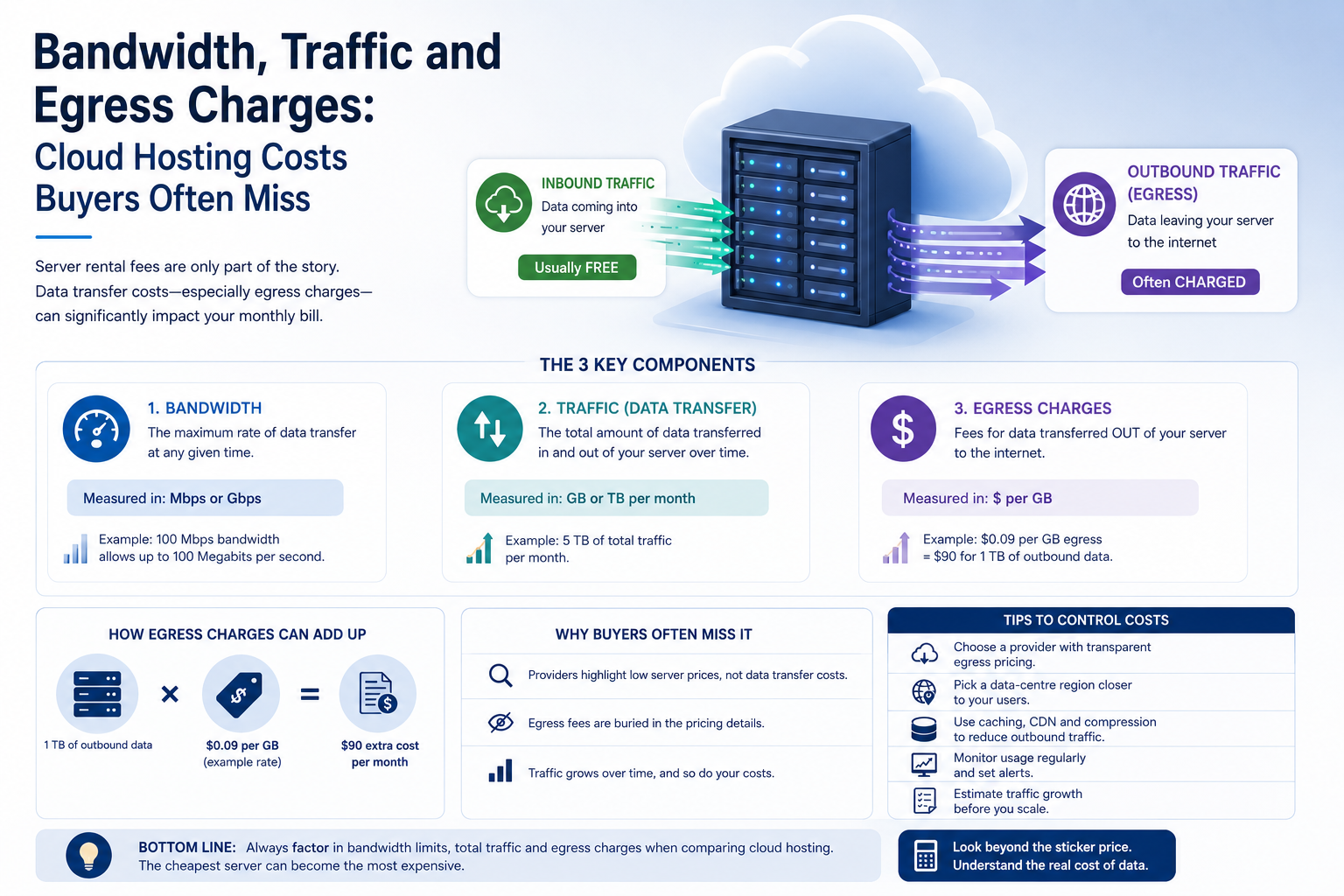
Bandwidth and Traffic Are Not the Same
Bandwidth describes how quickly data can move across a network connection.
It is commonly measured in:
- Megabits per second
- Gigabits per second
- Terabits per second for very large platforms
Traffic describes the total amount of data transferred over a period.
It is commonly measured in:
- Gigabytes
- Terabytes
- Petabytes for large-scale services
A server can therefore have a fast network connection while still having a limited monthly traffic allowance.
For example, a high-speed port may allow data to move quickly, but the provider may charge additional fees once the server exceeds its included transfer volume.
Both figures must be reviewed when comparing hosting services.
What Is Egress?
Egress is data leaving a cloud environment.
This may include data sent:
- From a cloud server to website visitors
- From cloud storage to users
- From the cloud to an office
- From one cloud region to another
- From one provider to another
- From a backup platform during recovery
- From an application to an external service
Many providers charge more for outbound traffic than inbound traffic.
Incoming data may be free or included, while data leaving the platform can generate a separate charge.
This is why a cloud environment with a low server price can become expensive when it serves large files, media or frequent downloads.
What Is Ingress?
Ingress is data entering the cloud environment.
Examples include:
- Uploading files to cloud storage
- Migrating data into a cloud server
- Receiving customer submissions
- Sending backups from an office to the cloud
- Replicating information into a cloud database
Many cloud providers do not charge for standard inbound traffic, although exceptions may apply.
Businesses should still verify the pricing because traffic through specialist services, private links or security platforms may be billed differently.
Free ingress can also make migration into a platform inexpensive while moving the same data out later becomes costly.
Monthly Traffic Allowances
Some hosting plans include a defined amount of monthly data transfer.
A plan might include:
- A fixed number of gigabytes
- Several terabytes of traffic
- Unmetered transfer subject to fair-use conditions
- Unlimited incoming traffic but limited outgoing traffic
- A combined allowance for inbound and outbound data
The business should confirm exactly how the allowance is calculated.
Ask whether it covers:
- Incoming traffic
- Outgoing traffic
- Traffic between servers
- Backup transfers
- Private-network traffic
- Traffic between data centres
- Content-delivery services
Two providers may advertise the same traffic allowance while measuring usage differently.
What Happens When the Allowance Is Exceeded?
Providers handle excess traffic in different ways.
The service may:
- Charge for every additional gigabyte
- Charge for additional traffic blocks
- Reduce network speed
- Require an upgrade to a larger plan
- Temporarily suspend the service
- Apply a fair-use review
- Bill the excess at a higher rate
The excess charge should be included in any hosting comparison.
A generous base allowance may offer better value than a cheaper server with expensive overage pricing.
Businesses should also ask whether traffic usage alerts are available before the limit is reached.
Port Speed and Guaranteed Bandwidth
A server may be connected through a port described as 1 Gbps, 10 Gbps or another speed.
This does not always mean the full capacity is continuously guaranteed.
The connection may be:
- Shared with other customers
- Subject to provider congestion
- Limited by the server plan
- Restricted during sustained use
- Capable of short bursts only
- Controlled by a fair-use policy
Guaranteed bandwidth is normally more expensive than shared or burstable connectivity.
For ordinary websites and business applications, shared connectivity may be sufficient.
Streaming, high-volume downloads, replication and data-intensive services may require more predictable network performance.
Committed and Burstable Bandwidth
Some hosting arrangements use committed bandwidth.
The business pays for a defined level of sustained network capacity. Short periods of higher usage may be allowed as bursts.
Pricing may depend on:
- Committed rate
- Peak usage
- Average usage
- A percentile billing method
- Total transferred data
- Port speed
This model is more common in dedicated hosting, colocation and larger infrastructure environments.
Buyers should ask how temporary peaks affect billing and whether sustained high usage triggers additional charges.
Traffic Between Cloud Regions
Moving data between cloud regions may incur additional charges.
This can happen when:
- Applications replicate databases to another region
- Backups are stored in a distant location
- Users are served from several regions
- Disaster recovery systems remain synchronised
- Workloads are divided between geographic locations
Multi-region infrastructure can improve resilience, but continuous replication may create substantial network costs.
The business should estimate both the amount of data copied and how frequently it changes.
A full data copy performed once may be inexpensive compared with continuous replication of a heavily used database.
Traffic Between Availability Zones
Some providers charge when data moves between availability zones within the same region.
This can affect applications designed with:
- Servers in multiple zones
- Cross-zone load balancing
- Replicated databases
- Distributed storage
- Active-active application nodes
Using several zones can improve availability, but it may also increase recurring traffic charges.
The architecture should minimise unnecessary communication between zones while maintaining the required resilience.
A highly available design should therefore be costed as a complete system rather than as several individual virtual machines.
Traffic Between Cloud Services
Charges may also apply when data moves between services within the same cloud platform.
Examples include traffic between:
- Virtual machines and object storage
- Application servers and managed databases
- Backup services and production systems
- Load balancers and server instances
- Security gateways and hosted applications
- Cloud networks connected through transit services
Some internal traffic may be free when resources are in the same region or network. Other paths may be billed.
The provider’s pricing documentation should be reviewed for the specific architecture being proposed.
Hybrid Cloud Traffic Costs
A hybrid environment connects cloud services with on-premises or colocated infrastructure.
Data may move continuously between:
- Offices and cloud applications
- Local servers and cloud storage
- Private infrastructure and cloud databases
- Primary systems and cloud backups
- Colocation and public cloud environments
The monthly cost may include:
- Cloud egress
- Internet connectivity
- VPN services
- Dedicated private links
- Provider port charges
- Network equipment
- Managed connectivity
A hybrid design can be technically effective while still becoming expensive if large data volumes move repeatedly between locations.
Applications and databases that communicate frequently should normally be placed close together.
Backup and Recovery Traffic
Cloud backup pricing often focuses on stored capacity, but network charges can also matter.
Uploading backups may be free, while restoring large amounts of data may incur egress fees.
This can be significant during:
- Full-system recovery
- Disaster recovery
- Provider migration
- Large database restoration
- Retrieval of archived data
Ask whether restore traffic is included in the backup service.
A low-cost backup platform may become expensive at the moment the business needs to recover its data.
Recovery time should also be considered. Even when transfer charges are acceptable, a limited network connection may make restoring several terabytes too slow.
Website and Application Traffic
Public websites and online applications generate outbound traffic whenever content is delivered to users.
Traffic consumption depends on:
- Number of visitors
- Page size
- Image size
- File downloads
- Video content
- Software updates
- API responses
- User location
- Caching
A small website with optimised pages may use relatively little traffic.
An application providing large product images, videos, reports or downloadable files can consume much more.
Traffic should be estimated using expected visitor numbers and average data delivered per session.
Content Delivery Networks
A content delivery network, or CDN, stores copies of content closer to users.
It can improve performance and reduce the amount of traffic sent directly from the main cloud server.
A CDN is particularly useful for:
- Images
- Videos
- Software downloads
- Static website files
- Global audiences
- High-traffic websites
However, CDN services also have their own pricing.
Charges may include:
- Data delivered to users
- Requests
- Storage
- Cache invalidation
- Security services
- Regional pricing
The complete cost should be compared with serving all content directly from the cloud server.
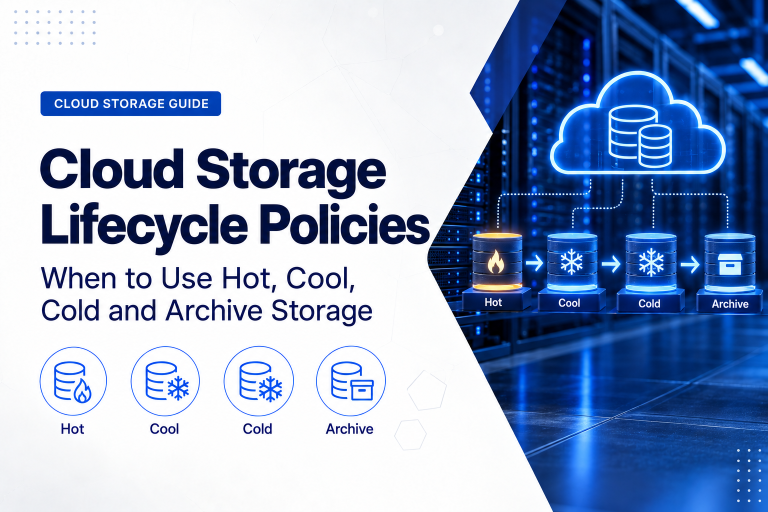
Storage Egress Charges
Cloud object-storage services may have low storage prices but separate retrieval and transfer fees.
Costs can vary according to the storage tier.
Frequently accessed storage may charge more per stored gigabyte but less for retrieval.
Archive storage may offer very low capacity pricing while charging more to retrieve data or requiring longer recovery times.
Before selecting a storage tier, consider:
- How often data is accessed
- How much data may be downloaded
- How quickly recovery is required
- Whether early deletion charges apply
- Whether data will be moved to another platform
Archive storage is economical only when data is rarely retrieved.
Database Replication Traffic
Database systems can generate large volumes of network traffic when they replicate changes.
Costs may increase when:
- Replicas are located in another zone
- Disaster recovery uses another region
- Reporting systems copy production data
- Several applications request the same information remotely
- Backups are transferred frequently
The database design should consider both availability and network cost.
Keeping primary application servers near the database can reduce latency and unnecessary traffic.
Remote replicas should be used where they support a defined recovery or operational requirement.
Monitoring and Log Transfer
Monitoring systems, security platforms and log-management services also transfer data.
A busy environment may generate large quantities of:
- Application logs
- Access logs
- Audit records
- Security events
- Performance metrics
- Network-flow data
Sending these records to another region or external service may create network and storage charges.
Logging should be detailed enough for security and troubleshooting without collecting unnecessary data indefinitely.
Retention periods should reflect business, legal and operational requirements.
Software Updates and Image Distribution
Large organisations may use cloud servers to distribute:
- Operating-system updates
- Application packages
- Virtual-machine images
- Container images
- Security definitions
- Installation files
Repeated downloads across many locations can increase egress.
Caching, local repositories or a CDN may reduce duplicated transfers.
This is especially important when the same large file is downloaded repeatedly by many users or servers.
Data Migration Out of a Provider
Egress costs can affect how easily a business moves to another platform.
Migrating out may require transferring:
- Server images
- Databases
- File storage
- Backups
- Logs
- Archived data
The larger the environment, the more expensive and time-consuming the move may become.
Before selecting a provider, ask:
- How data can be exported
- Which formats are available
- What egress fees apply
- Whether physical transfer devices are supported
- How long the migration may take
- Whether assistance is available
Exit planning should be considered before the service is adopted, not only when the business decides to leave.
Unmetered Does Not Always Mean Unlimited
Some providers advertise unmetered bandwidth.
This generally means traffic is not charged by the gigabyte, but another limit may still apply.
The service may restrict:
- Port speed
- Sustained utilisation
- Certain traffic types
- Commercial redistribution
- Excessive use
- Network-intensive applications
Fair-use terms should be reviewed carefully.
An unmetered 100 Mbps connection may provide less total capacity than a metered 1 Gbps connection with a generous allowance.
The better option depends on the workload’s traffic volume and performance requirements.
Estimate Traffic Before Choosing a Plan
For an existing service, review actual network usage over several months.
Measure:
- Total inbound traffic
- Total outbound traffic
- Peak transfer periods
- User downloads
- Backup transfers
- Inter-region traffic
- Application-to-database traffic
- Growth rate
For a new service, estimate traffic using:
- Expected user numbers
- Average page or file size
- Sessions per user
- Backup frequency
- Database replication volume
- Software distribution
- Expected growth
Include a reasonable margin, but avoid paying for an extremely large allowance without evidence that it will be used.
Monitor Traffic After Deployment
Traffic estimates should be reviewed after the service goes live.
Monitoring can identify:
- Unexpected downloads
- Misconfigured backups
- Excessive replication
- Automated attacks
- Compromised accounts
- Application errors
- Unnecessary cross-region traffic
- Sudden customer growth
Set alerts for both traffic volume and forecast cost.
A security incident can generate significant network charges before the business notices the underlying problem.
Ways to Reduce Egress Costs
Businesses may be able to reduce network costs by:
- Keeping connected services in the same region
- Placing applications close to their databases
- Using caching
- Compressing files
- Optimising images
- Using a CDN
- Removing duplicate transfers
- Scheduling backups efficiently
- Reviewing replication frequency
- Selecting a plan with an included allowance
- Deleting unused services
- Monitoring unusual activity
Cost reduction should not compromise resilience or recovery requirements.
For example, eliminating off-site backups to avoid traffic charges would create greater business risk than the saving justifies.
Compare Providers on the Same Basis
When comparing cloud or hosting quotations, request the same information from every provider.
The comparison should include:
| Cost Area | Information to Request |
|---|---|
| Port speed | Maximum and guaranteed connection speed |
| Included traffic | Monthly inbound and outbound allowance |
| Excess traffic | Price per additional gigabyte or terabyte |
| Regional transfer | Charges between data-centre regions |
| Internal transfer | Charges between cloud services or zones |
| Backup traffic | Upload and restore charges |
| Public traffic | Internet egress pricing |
| Private connectivity | VPN or dedicated-link charges |
| Monitoring | Traffic reports, alerts and billing visibility |
A low server price should not be compared with a higher all-inclusive price without accounting for traffic and support.
Common Buyer Mistakes
Comparing Only Port Speed
A fast port does not reveal the monthly traffic allowance or excess charge.
Assuming All Internal Traffic Is Free
Transfers between zones, regions or cloud services may be billed.
Ignoring Restore Costs
Backup uploads may be free while disaster recovery generates substantial egress charges.
Underestimating Website Content
Large images, downloads and video can consume far more traffic than ordinary pages.
Forgetting Replication
Database, storage and backup replication can create continuous transfer costs.
Choosing a Distant Low-Cost Region
Lower server pricing may be offset by latency and increased transfer charges.
Assuming Unmetered Means Unlimited
Fair-use policies and speed restrictions may still apply.
Failing to Plan for Migration
Moving a large dataset out of the provider can be expensive and slow.
A Practical Traffic-Cost Checklist
Before approving a cloud hosting service, ask:
- What network port speed is included?
- Is the bandwidth shared or guaranteed?
- How much monthly traffic is included?
- Are inbound and outbound traffic measured separately?
- What counts toward the allowance?
- What happens when the allowance is exceeded?
- What is the excess traffic price?
- Are transfers between servers free?
- Are transfers between zones charged?
- Are transfers between regions charged?
- Are backup uploads and restores charged?
- Are public IP or gateway services billed separately?
- Does a CDN reduce origin traffic?
- Are traffic alerts available?
- Can historic usage reports be exported?
- Are there fair-use restrictions?
- What would it cost to migrate all data out?
- How quickly could the data be transferred?
These questions reveal costs that may not appear in the headline server price.
Final Recommendation
Cloud buyers should evaluate network pricing together with CPU, memory and storage.
Confirm the port speed, included monthly traffic, excess charges and whether transfers between zones, regions, backups and external networks are billed separately.
Estimate both normal usage and high-demand periods. Include website delivery, database replication, backups, monitoring and future data migration.
A hosting plan with a higher base price may offer better value when it includes a generous traffic allowance and predictable overage terms.
The best service is not simply the one with the fastest connection or lowest virtual-machine price. It is the one that provides sufficient network performance at a transparent and manageable total cost.
Ila Express provides cloud servers, VPS hosting, dedicated infrastructure and managed hosting with clearly defined network and traffic options.
Contact Ila Express to compare hosting plans and estimate the full cost of bandwidth, traffic, backups and data transfer for your workload.