When deploying a cloud server, businesses often focus first on CPU, memory, storage and monthly price.
The physical region hosting the server can be just as important.
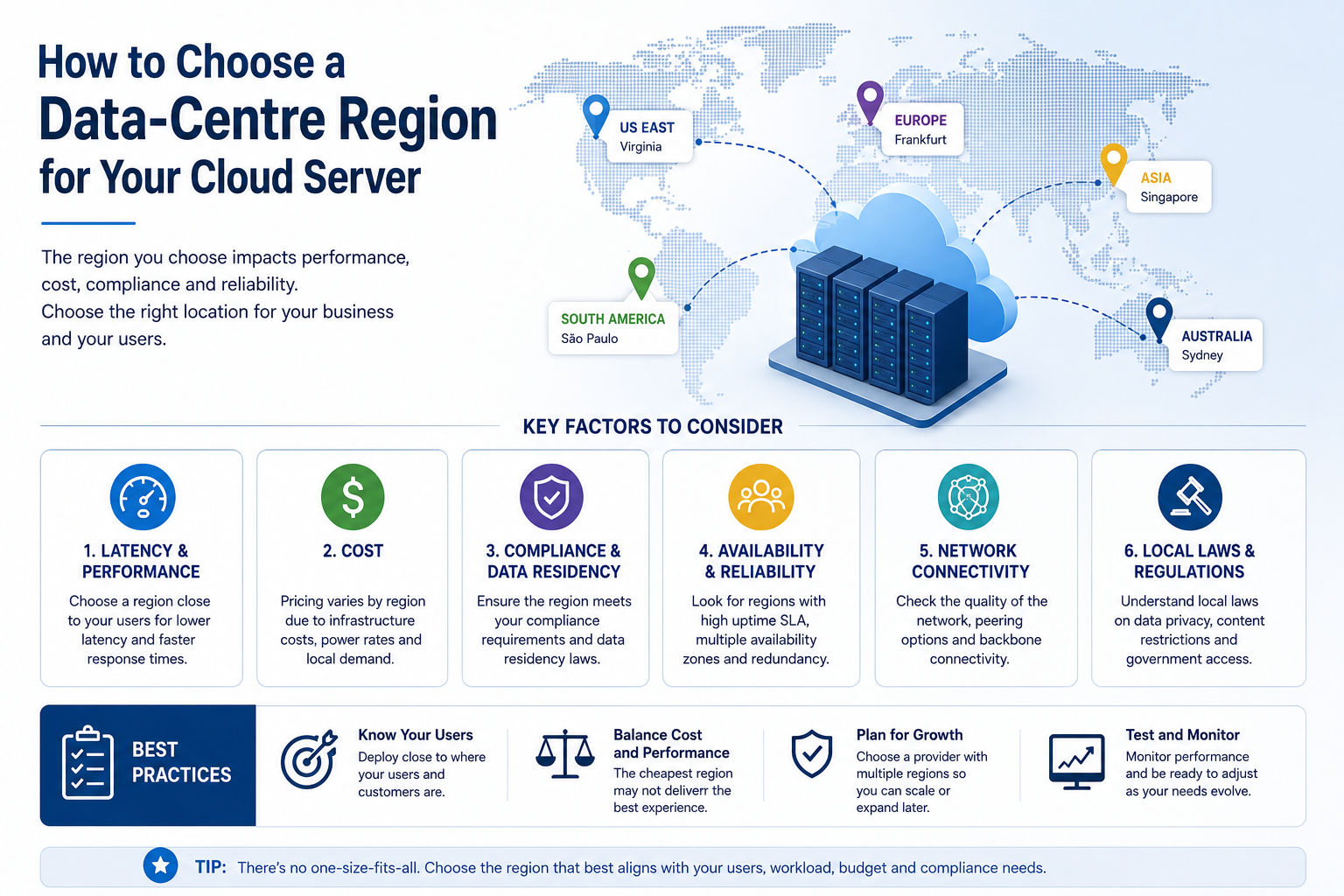
A data-centre region affects application response times, data location, service availability, network costs and the options available for backup and disaster recovery.
Selecting the nearest region may appear to be the obvious choice, but distance is only one factor. The most suitable location is the one that balances user performance, legal requirements, resilience, service availability and total cost.
What Is a Cloud Data-Centre Region?
A cloud region is a geographic area where a provider operates cloud infrastructure.
A region may contain one data centre or several separate facilities. Larger cloud platforms may divide a region into multiple availability zones designed to reduce the risk that one facility failure affects every service.
A region normally provides access to resources such as:
- Virtual machines
- Cloud storage
- Managed databases
- Backup services
- Load balancers
- Private networking
- Monitoring
- Security tools
Not every provider uses the terms region and availability zone in the same way.
Before selecting a location, ask how many physical facilities support the region and whether services can operate across them.
Begin With Your Users
The first question should be where the application’s users are located.
Data must travel between the user and the server. Longer or inefficient network routes can increase latency, which is the delay before information begins moving between two systems.
High latency may affect:
- Websites
- Remote desktop sessions
- Voice and video applications
- Databases
- Interactive business software
- Online transactions
- Application programming interfaces
- Real-time collaboration
A server placed close to most users will often provide better response times than one located on another continent.
However, geographic distance does not always match network performance. A nearby data centre may use a poor network route, while a more distant facility may have stronger connectivity.
Where performance is important, test real network latency rather than relying only on a map.
Identify the Main User Group
A business may have users in several countries or regions.
In that situation, decide which group is most important to the application.
For example:
- An internal system may be placed near the main office.
- A customer portal may be placed near the largest customer market.
- A global website may use several regions or a content delivery network.
- A database may remain close to the application servers that access it.
- A backup platform may be located farther away for resilience.
Do not assume every service must be hosted in the same location.
Different workloads may require different regional strategies.
Understand Latency Requirements
Not every workload is equally sensitive to latency.
Latency-Sensitive Workloads
Applications that benefit from low latency include:
- Remote desktops
- Voice services
- Interactive databases
- Financial transactions
- Gaming platforms
- Real-time control systems
- Applications making frequent database requests
Even small delays can become noticeable when an application performs many requests during one user action.
Less Latency-Sensitive Workloads
Distance may be less important for:
- Backups
- Archives
- Batch processing
- Email delivery
- Scheduled reporting
- Long-term storage
- Development systems with few users
These workloads may allow the business to prioritise cost, resilience or data-location requirements instead.
Check Data Residency Requirements
Data residency describes where information is physically stored or processed.
Some businesses must keep certain information within a specific country, economic area or approved jurisdiction.
Requirements may arise from:
- Customer contracts
- Industry regulations
- Government policies
- Internal security rules
- Insurance conditions
- Data-protection obligations
- Software licensing
The appropriate region may depend on the type of data being handled.
Customer records, employee information, health data, payment information and government data may have different requirements.
Do not assume that choosing a regional server automatically keeps every related copy of the data in that location.
Backups, snapshots, logs and support systems may be stored elsewhere unless the service is configured appropriately.
Review Where All Copies Are Stored
Ask the provider where it stores:
- Primary server disks
- Snapshots
- Backups
- Replicated data
- Monitoring logs
- Security logs
- Support information
- Disaster recovery copies
A server may operate in one region while its backup service stores data in another.
This may be beneficial for disaster recovery, but it could conflict with contractual or regulatory requirements.
The provider should be able to explain which services remain within the selected region and which use other locations.
Consider Data Sovereignty
Data sovereignty means that information may be subject to the laws of the jurisdiction where it is stored or processed.
This is related to, but different from, data residency.
A business should consider:
- The country where the data centre is located
- The provider’s legal jurisdiction
- Customer contractual requirements
- Government access rules
- Cross-border data-transfer arrangements
- Industry-specific obligations
Legal requirements can be complex and may change.
Businesses handling sensitive or regulated information should seek appropriate legal or compliance guidance rather than selecting a region based only on a provider’s marketing description.
Compare Regional Service Availability
Cloud providers do not always offer the same products in every region.
A location may support virtual machines but not a particular:
- Processor family
- Storage tier
- Managed database
- Backup service
- Security tool
- Graphics processor
- Load-balancing feature
- Private connectivity service
- Automation platform
New regions may have fewer services or limited capacity.
Older and larger regions may provide a broader selection, but they may also have different pricing or availability constraints.
Before committing to a location, confirm that it supports the complete architecture—not only the initial virtual machine.
Check Hardware and Capacity Availability
A cloud region may list a server type without guaranteeing that capacity is always available.
This can become important when the business needs:
- Large memory configurations
- Dedicated processors
- Graphics processors
- High-performance storage
- Bare-metal servers
- Rapid scaling
- Many identical virtual machines
Ask whether the required resources are normally available and what happens if the preferred server type cannot be deployed.
For critical projects, consider whether an alternative server class or second region can be used.
Understand Availability Zones
An availability zone is generally a separate infrastructure location within a cloud region.
Using more than one zone can help protect an application from a failure affecting one data-centre facility.
A multi-zone design may distribute:
- Application servers
- Databases
- Load balancers
- Storage replicas
- Network services
However, placing a server in a region with several zones does not automatically make the application highly available.
The workload must be configured to use those zones.
A single virtual machine located in one zone can still become unavailable.
Ask How Independent the Zones Are
The term availability zone can mean different things between providers.
Ask whether zones have:
- Separate power
- Separate cooling
- Independent network connections
- Physical distance between facilities
- Independent flood or fire risk
- Separate maintenance schedules
Also confirm whether the provider offers an availability commitment for an application distributed across several zones.
True resilience depends on the complete design rather than the number of zones shown in the provider portal.
Compare Regional Pricing
The same cloud resource may have different prices in different regions.
Regional costs can vary for:
- Virtual CPUs
- Memory
- Storage
- Backups
- Snapshots
- Public IP addresses
- Data transfer
- Managed databases
- Support services
A lower-cost region may appear attractive, but savings should be compared with performance and data-transfer requirements.
Hosting far from users may reduce the server price while increasing network costs or reducing application responsiveness.
The comparison should include the complete monthly service rather than only the virtual machine.
Review Data-Transfer Charges
Cloud providers may charge when data moves:
- Out to the internet
- Between regions
- Between availability zones
- Between cloud services
- To another provider
- To an office or colocation facility
These charges can become important in hybrid or multi-region environments.
For example, placing an application server in one region and its database in another can create both latency and recurring transfer costs.
Where possible, keep systems that exchange large amounts of data close together.
Ask which network paths are free, included or separately billed.
Keep Applications and Databases Close
Application servers and their databases usually communicate frequently.
Placing them in different regions can result in:
- Slower response times
- Higher transfer charges
- More complex security
- Greater dependency on external network links
- More difficult troubleshooting
As a general principle, keep tightly connected application components in the same region unless there is a specific resilience or regulatory reason to separate them.
Data replication to another region can still be used for recovery, but the primary application path should remain efficient.
Consider Connectivity to Offices and Other Infrastructure
A cloud server may need to connect to:
- Office networks
- Branch locations
- On-premises servers
- Colocation infrastructure
- Other cloud platforms
- Software suppliers
- Customer systems
Review how each location reaches the selected region.
Important considerations include:
- Internet routing
- Private network options
- VPN performance
- Direct connectivity
- Bandwidth
- Latency
- Redundant network paths
- Provider peering
A region close to users may still be unsuitable if it does not provide reliable connectivity to the systems on which the application depends.
Consider Internet Exchange and Carrier Connectivity
Data centres connected to several network carriers and internet exchange points may provide better routing and resilience.
Ask the provider about:
- Upstream carriers
- Network redundancy
- Peering arrangements
- Regional internet exchanges
- Distributed denial-of-service protection
- Network capacity
- Historical availability
This is particularly important for public websites, online platforms and services used by customers in several countries.
Cloud server specifications cannot compensate for weak or unreliable network connectivity.
Plan for Disaster Recovery
The primary region should be selected together with a recovery strategy.
A second region may be used for:
- Off-site backups
- Data replication
- Standby servers
- Disaster recovery
- Emergency restoration
- Secondary application capacity
The backup region should be sufficiently separate from the primary location to reduce the chance that both are affected by the same event.
Possible shared risks include:
- Regional power disruption
- Major network failure
- Natural disaster
- Political instability
- Provider-wide platform problems
Geographic separation improves resilience but may increase storage, replication and data-transfer costs.
Define Recovery Requirements First
Before deploying a second region, define:
- Recovery point objective
- Recovery time objective
- Which systems must be restored first
- How data will be replicated
- How users will be redirected
- Who will initiate recovery
- How often the process will be tested
Simply copying data to another region does not create a complete disaster recovery solution.
The business must be able to start the replacement infrastructure, restore services and verify that applications operate correctly.
Avoid Unnecessary Multi-Region Complexity
Operating across several regions can improve resilience and global performance, but it also increases complexity.
A multi-region design may require:
- Data replication
- Traffic management
- Consistent security policies
- Centralised identity
- Backup coordination
- Application synchronisation
- Conflict handling
- Additional monitoring
- Higher network costs
A small business application may not need an active multi-region architecture.
A simpler design using one primary region and an independent backup location may provide an appropriate balance of cost and recovery capability.
Review Environmental and Energy Considerations
Some businesses include environmental impact in cloud procurement.
Regional differences may include:
- Electricity generation sources
- Data-centre energy efficiency
- Cooling methods
- Water usage
- Local climate
- Renewable energy commitments
- Carbon reporting
Provider sustainability claims should be reviewed carefully.
A region described as using renewable energy may rely on contracts or offsets rather than receiving renewable electricity continuously.
Environmental considerations should be assessed alongside performance, resilience and compliance requirements.
Consider Political and Operational Stability
The operating environment around a data centre can affect long-term risk.
Factors may include:
- Political stability
- Energy reliability
- Network infrastructure
- Natural-disaster exposure
- Trade restrictions
- Local taxation
- Currency risk
- Legal predictability
- Availability of technical staff
These issues may be less important for a temporary development server than for infrastructure expected to support a critical service for several years.
The business should avoid selecting a region solely because it has the lowest advertised price.
Check Support Coverage
Support quality may differ between regions.
Confirm:
- Whether technical support covers the selected region
- Which languages are available
- Whether support operates outside business hours
- Whether local engineers are available
- How hardware or platform incidents are escalated
- Whether managed services are available
- Which response times apply
A provider may offer global infrastructure but limited local operational support.
For critical systems, regional support capability should be evaluated before deployment.
Think About Future Expansion
The selected region should support more than the first server.
Consider whether the business may later need:
- Additional virtual machines
- Larger storage systems
- Managed databases
- Private networking
- Load balancing
- Container platforms
- Backup services
- Dedicated hardware
- Connection to other regions
Migrating to another region later may require downtime, data transfer and application reconfiguration.
Choosing a region with sufficient service depth and expansion options can reduce future migration costs.
Use a Pilot Before Committing
Where possible, test the proposed region before moving a critical workload.
A pilot can measure:
- User latency
- Application response
- File-transfer performance
- VPN stability
- Database behaviour
- Network routing
- Backup speed
- Monitoring
- Support responsiveness
Testing should involve users and systems from the locations that will access the service.
A short technical test can reveal problems that are not visible in provider documentation.
Common Region-Selection Mistakes
Choosing Only the Nearest Location
The nearest region may not provide the best network route, service range or resilience.
Choosing Only the Cheapest Region
Lower infrastructure pricing may be offset by higher latency, transfer costs or limited support.
Ignoring Backup Location
Primary data may remain local while backups are stored in another jurisdiction.
Assuming a Region Is Automatically Highly Available
A workload must be designed across independent facilities to benefit from regional redundancy.
Separating Dependent Systems
Placing applications and databases far apart can increase latency and network charges.
Ignoring Future Services
A region suitable for one virtual machine may not support later database, security or networking requirements.
Building Multi-Region Infrastructure Too Early
Complex architecture may increase cost and management effort without delivering a necessary business benefit.
A Practical Region Selection Checklist
Before selecting a cloud data-centre region, ask:
- Where are the main users located?
- How sensitive is the application to latency?
- Where must business data be stored?
- Where will backups and logs be kept?
- Which legal or contractual requirements apply?
- Does the region offer all required cloud services?
- Is the required server capacity available?
- How many independent availability zones are provided?
- What does the virtual machine cost in the region?
- What data-transfer charges apply?
- How will the cloud environment connect to offices and other systems?
- Are the application and database located close together?
- Which region will support disaster recovery?
- What support coverage is available?
- Can the environment expand without moving later?
- Has performance been tested from important user locations?
The preferred region should perform well across these areas rather than winning on only one factor.
Final Recommendation
Choose a cloud data-centre region close to the main users and connected systems when application responsiveness is important.
Confirm that the region meets data-location and contractual requirements, and verify where backups, snapshots and logs will be stored.
Review service availability, regional pricing, transfer charges, support and expansion options before committing.
For critical workloads, use independent backups or disaster recovery in a suitably separate location. Avoid unnecessary multi-region complexity unless the availability or geographic requirements justify it.
The best region is not automatically the nearest or cheapest. It is the location that provides the right balance of performance, compliance, resilience and total operating cost.
Ila Express provides cloud servers, managed hosting, backup and hybrid infrastructure across regional data-centre environments.
Contact Ila Express to compare cloud locations and select a suitable region for your users, applications and data requirements.