Businesses can acquire computing capacity in several ways.
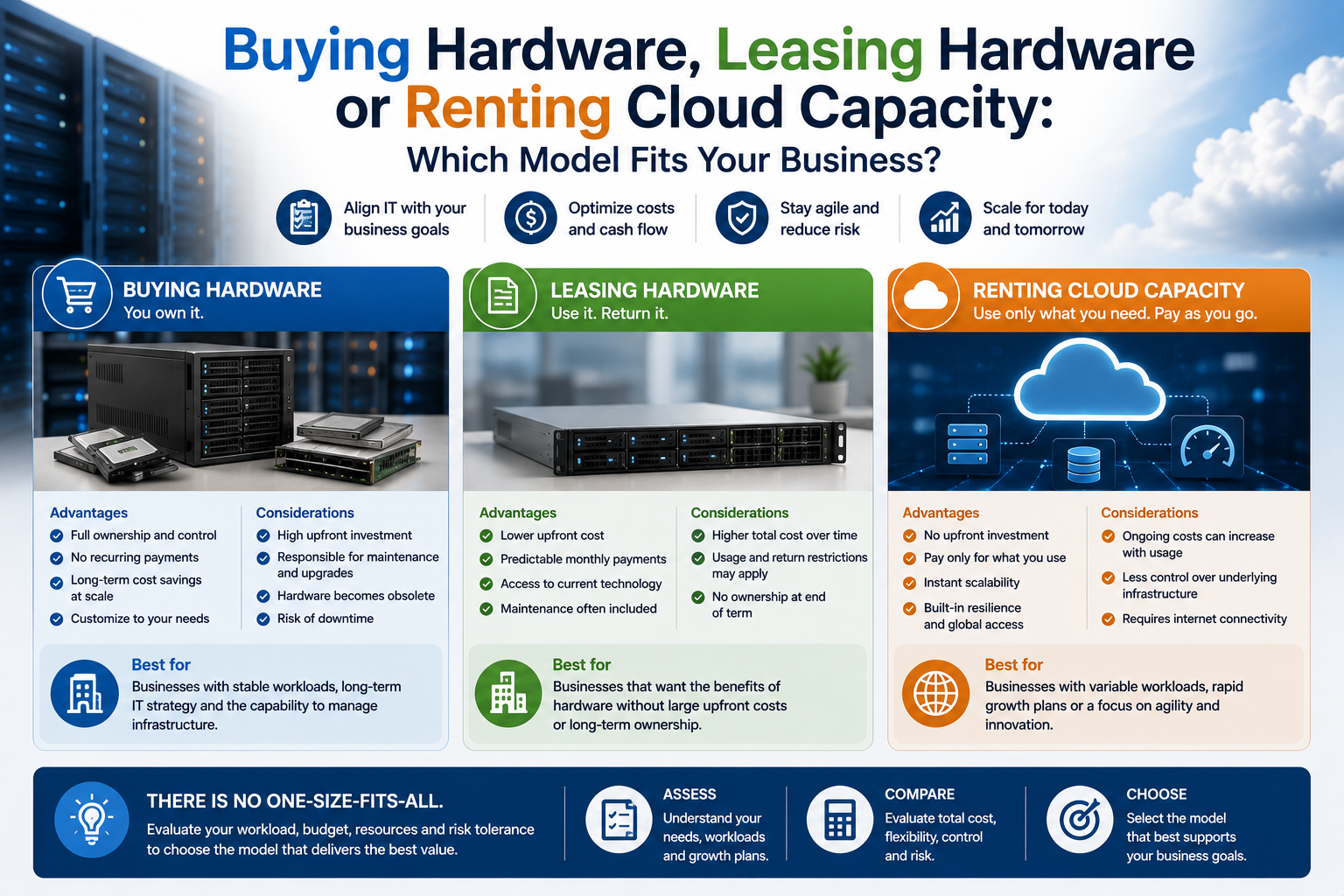
They can purchase servers, computers and storage equipment outright. They can lease hardware over an agreed term. They can also rent virtual servers, storage and related services from a cloud provider.
Each model changes how the organisation pays, manages risk and responds to future requirements.
Buying hardware provides ownership and long-term control. Leasing spreads payments and can support regular replacement. Cloud capacity offers faster deployment and greater flexibility but creates ongoing service charges and provider dependency.
The right choice depends on workload stability, available capital, internal expertise, expected growth and the cost of downtime.
Begin With the Business Requirement
The procurement model should follow the workload rather than determine it.
Before comparing purchase prices and monthly fees, define:
- What the equipment or service must do
- How many users it must support
- Required performance
- Storage capacity
- Security requirements
- Availability requirements
- Expected service life
- Growth assumptions
- Support needs
- Recovery objectives
A five-year-old file server, a temporary development environment and a rapidly growing online platform should not automatically use the same procurement model.
The organisation should first understand whether the requirement is stable, temporary, predictable or highly variable.
What Does Buying Hardware Mean?
Buying hardware means the business purchases and owns the physical equipment.
This may include:
- Desktop computers
- Laptops
- Servers
- Storage systems
- Network switches
- Firewalls
- Backup appliances
- Racks and power equipment
The business normally pays most of the cost at the beginning and records the equipment as a capital asset according to its accounting policies.
Ownership gives the organisation control over how the hardware is configured, used and retained.
It also transfers most lifecycle responsibility to the business.
Advantages of Buying Hardware
Purchasing can be attractive when the workload is stable and the equipment will remain useful for several years.
Potential advantages include:
- Full ownership
- No continuing equipment-rental charge
- Greater configuration control
- Ability to retain hardware beyond the planned term
- Potentially lower long-term cost
- Freedom to select support separately
- Predictable local performance
- No dependency on cloud usage pricing
A server purchased for a steady workload may remain cost-effective after the initial investment has been recovered.
The business can also continue using it after the warranty period, although this introduces additional operational risk.
Limitations of Buying Hardware
Ownership brings responsibility.
The business may need to manage:
- Installation
- Power and cooling
- Physical security
- Warranty
- Maintenance
- Spare parts
- Monitoring
- Backup
- Software licences
- Disposal
- Future replacement
Capacity must also be planned in advance.
If the business buys too little, an early upgrade may be required. If it buys too much, capital remains tied up in equipment that is underused.
Purchased hardware can also become obsolete before the end of its accounting or operational life.
When Buying Hardware Makes Sense
Buying is often suitable when:
- Workload demand is stable
- Equipment will be used continuously
- The business has suitable facilities
- Internal or contracted IT support is available
- Data must remain under direct control
- Local performance is important
- Specialised hardware is required
- Long-term cost is more important than initial flexibility
It may also suit organisations that prefer asset ownership and have sufficient capital available.
What Does Leasing Hardware Mean?
Leasing allows the business to use hardware for a defined term while making regular payments.
The leasing company or finance provider may retain legal ownership during the agreement.
At the end of the term, the business may:
- Return the equipment
- Replace it with newer equipment
- Extend the lease
- Purchase it
- Follow another option defined in the contract
Leasing is commonly used for computers, servers, networking equipment and other business technology.
The exact financial and accounting treatment depends on the agreement and applicable rules.
Advantages of Leasing Hardware
Leasing can reduce the initial capital requirement.
Potential advantages include:
- Predictable monthly or quarterly payments
- Easier cash-flow planning
- Regular equipment-refresh cycles
- Reduced risk of retaining obsolete hardware
- Ability to acquire better equipment without a large initial payment
- Possible inclusion of warranty or support
- Simplified standardisation across users or sites
Leasing can be particularly useful when a business needs to deploy many computers at once but prefers to spread the cost.
It may also support a planned three- or four-year replacement programme.
Limitations of Leasing Hardware
Leasing does not always reduce the total amount paid.
Potential disadvantages include:
- Higher total cost than purchasing
- Fixed contract period
- Early-termination charges
- Return conditions
- End-of-term administration
- Restrictions on modification
- Responsibility for damage or missing equipment
- Continuing payments during periods of low use
The business should understand whether support, insurance and replacement are included.
A lease may finance only the hardware, leaving the customer responsible for all technical management.
Review End-of-Lease Conditions
The end of the agreement can create unexpected cost or disruption.
Confirm:
- Whether equipment must be returned
- Required condition
- Who pays shipping
- Whether storage devices must be erased
- Whether the business can purchase the equipment
- How purchase price is calculated
- What happens if equipment is returned late
- Whether automatic renewal applies
- How replacement equipment is arranged
For computers and servers containing business data, secure data removal should be planned before return.
The business should retain evidence that storage devices were erased appropriately.
When Leasing Makes Sense
Leasing may be appropriate when:
- The business wants predictable payments
- Capital should remain available for other purposes
- Equipment must be replaced regularly
- Many devices are being deployed
- Standardisation is important
- Technology becomes obsolete quickly
- The organisation wants a defined lifecycle programme
- Ownership is less important than access to current equipment
It is often used for employee computers because these devices have predictable refresh periods and may need standard support.
What Does Renting Cloud Capacity Mean?
Cloud services allow businesses to rent computing resources from a provider.
These resources may include:
- Virtual processors
- Memory
- Storage
- Databases
- Backup
- Networking
- Security services
- Load balancing
- Monitoring
- Application platforms
The customer normally pays according to reserved capacity, actual use or a combination of both.
No physical server needs to be installed in the customer’s office.
The provider operates the underlying data-centre infrastructure.
Advantages of Cloud Capacity
Cloud infrastructure can be provisioned quickly and adjusted without purchasing new hardware.
Potential advantages include:
- Fast deployment
- Flexible capacity
- Reduced facility requirements
- Access from several locations
- Easier creation of temporary environments
- Integrated backup and recovery options
- Availability across several regions
- Access to managed services
- Reduced hardware-maintenance responsibility
Cloud is particularly useful when demand changes or when the business cannot predict its long-term infrastructure requirements accurately.
Limitations of Cloud Capacity
Cloud removes some capital expenditure but creates continuing operating costs.
Potential disadvantages include:
- Monthly service charges
- Data-transfer costs
- Backup and storage fees
- Provider dependency
- Complex pricing
- Need for cost monitoring
- Internet connectivity dependency
- Less control over underlying hardware
- Possible migration and exit costs
A cloud environment that is not monitored may accumulate unused servers, storage and snapshots.
Flexible capacity is valuable only when resources are actively managed.
Cloud Does Not Remove Management Responsibility
The provider normally manages physical infrastructure, but the customer may remain responsible for:
- Operating-system updates
- Applications
- User accounts
- Permissions
- Firewall rules
- Backup policy
- Monitoring
- Data protection
- Security incidents
A managed cloud provider can perform some of these tasks, but the service scope should be documented.
The term “cloud” describes the delivery model, not the level of administration included.
Capital Expenditure and Operating Expenditure
Buying hardware is commonly associated with capital expenditure.
Cloud services and many leases are commonly treated as operating expenditure or recurring contractual costs, although exact accounting treatment can vary.
From a business perspective, the main difference is timing.
Buying requires a larger initial payment.
Leasing and cloud spread payments across time.
Neither model is automatically cheaper.
A complete comparison should include:
- Initial payment
- Financing cost
- Monthly charges
- Support
- Licences
- Facilities
- Backup
- Security
- Administration
- Replacement
- Exit costs
The organisation’s financial adviser or accountant should confirm the appropriate accounting treatment.
Compare Total Cost of Ownership
The purchase price of hardware is only one component of cost.
A fair comparison should include the complete period of expected use.
For purchased equipment, consider:
- Hardware price
- Installation
- Warranty
- Software licences
- Power
- Cooling
- Rack space
- Network equipment
- Backup
- Maintenance
- Internal IT time
- Future disposal
For leased equipment, consider:
- Initial fees
- Regular payments
- Support
- Insurance
- Return charges
- End-of-term purchase
- Early-termination cost
For cloud capacity, consider:
- Compute
- Storage
- Data transfer
- Backup
- Public addresses
- Security services
- Monitoring
- Support
- Managed administration
- Migration
- Long-term data retention
Comparisons should use the same workload and service level.
Avoid Comparing Hardware Price With Cloud Price Alone
A common mistake is comparing the purchase price of one server with the monthly cost of one cloud virtual machine.
This ignores differences such as:
- Data-centre facilities
- Electricity
- Hardware replacement
- Backup
- Support
- Redundancy
- Administration
- Disaster recovery
It can also work in the opposite direction.
A cloud quotation may include advanced availability and managed services that the business does not actually require.
The comparison should match the complete service delivered by each option.
Workload Stability Matters
Stable workloads often favour ownership or longer-term commitments.
Examples include:
- File servers
- Fixed business applications
- Local databases
- Established virtualisation environments
- Infrastructure with predictable utilisation
Variable or temporary workloads may favour cloud.
Examples include:
- Development projects
- Seasonal applications
- Campaign websites
- Temporary testing
- New services with uncertain demand
- Rapidly growing platforms
A business should avoid purchasing substantial hardware for a requirement that may disappear after several months.
It should also avoid paying flexible cloud rates indefinitely for a stable workload without reviewing alternatives.
Capacity Planning
Purchased and leased hardware requires advance capacity planning.
The business must estimate:
- Processor requirements
- Memory
- Storage
- Network capacity
- Growth
- Redundancy
Cloud allows faster adjustment, but scaling is not always automatic.
The application may need to be redesigned or restarted to use additional capacity.
Cloud also makes overprovisioning less visible because unused resources continue generating charges.
Every model requires capacity management, but the consequences differ.
Consider the Expected Lifecycle
Business equipment often remains in service for several years.
During that period:
- Warranty may expire
- Software requirements may increase
- Security standards may change
- Capacity may become insufficient
- Replacement parts may become harder to obtain
Buying works best when the equipment remains useful for most of its planned lifecycle.
Leasing can reduce lifecycle uncertainty by defining a replacement point.
Cloud avoids the customer owning ageing hardware, but the hosted operating system and application can still become obsolete.
Infrastructure location does not remove software lifecycle responsibility.
Support and Maintenance
Support arrangements can influence which model is practical.
Purchased hardware may include:
- Manufacturer warranty
- On-site repair
- Parts replacement
- Technical support
Leased hardware may bundle support or require a separate contract.
Cloud support may cover only the provider’s platform unless managed administration is purchased.
Ask:
- Who monitors the system?
- Who responds to failure?
- Are replacement parts included?
- Is support available outside business hours?
- Who maintains software?
- What response times apply?
- What tasks are excluded?
The cheapest acquisition model may become expensive if support gaps create lengthy downtime.
Availability and Redundancy
Purchased hardware can be highly available, but redundancy requires additional equipment and design.
This may include:
- Multiple servers
- Redundant power supplies
- RAID storage
- Spare equipment
- Clustering
- Secondary sites
Leasing can finance the same architecture but does not create availability by itself.
Cloud platforms may make multi-zone or multi-region designs easier to deploy.
However, one cloud virtual machine in one region remains a single point of failure.
Availability must be designed and paid for under every model.
Backup and Disaster Recovery
Each procurement method requires a recovery plan.
Purchased hardware may use:
- Local backup appliances
- Cloud backup
- Secondary servers
- Off-site media
Leased hardware still requires separate backup because the equipment provider may protect only the physical asset.
Cloud workloads may use:
- Snapshots
- Object-storage backup
- Cross-region copies
- Replication
- Standby servers
Do not assume that leasing or cloud automatically includes backup.
The business should define recovery point and recovery time requirements separately.
Security Considerations
Buying hardware provides direct physical control, but the business must secure the complete environment.
Responsibilities may include:
- Physical access
- Network security
- Updates
- Monitoring
- Backup
- Incident response
Leased hardware normally creates similar customer responsibilities.
Cloud providers protect the underlying facilities and platform, while the customer secures accounts, applications and data.
The best model is not determined by the word “secure.” It depends on how well responsibilities are implemented.
Data Location and Control
Some organisations require direct control over where data is stored.
Buying or leasing hardware may provide stronger physical certainty when equipment remains inside an approved facility.
Cloud providers may offer selectable regions and contractual commitments.
Consider:
- Data residency
- Customer contracts
- Industry rules
- Backup location
- Support access
- Cross-border transfer
- Legal jurisdiction
Direct ownership does not automatically create compliance, and cloud use does not automatically prevent it.
The complete operating model must be reviewed.
Internet and Network Dependency
Cloud services depend on connectivity between users and the provider.
Critical cloud workloads may require:
- Redundant internet connections
- Backup connectivity
- Reliable firewalls
- VPN
- Suitable bandwidth
- Network monitoring
Purchased or leased local servers may continue operating during an internet outage if users and applications remain on the local network.
However, local equipment can still become unavailable because of office power, cooling or network failure.
Each model shifts rather than removes dependency.
Flexibility and Speed of Deployment
Cloud usually provides the fastest initial deployment.
A virtual server can often be created without waiting for manufacturing, shipping or installation.
Leasing may still require equipment delivery.
Purchasing can require the longest preparation, particularly for specialist hardware.
Deployment speed matters when:
- A new project must begin quickly
- Capacity is urgently required
- A new office is opening
- Temporary resources are needed
- Hardware supply is uncertain
For long-term stable systems, faster deployment may be less important than lifecycle cost.
Ownership and Residual Value
Purchased equipment may retain resale or reuse value.
The business may:
- Sell it
- Move it to a less demanding role
- Use it for testing
- Keep it as a spare
- Donate or recycle it
Residual value is often limited because technology becomes outdated and secure disposal creates cost.
Leased equipment generally returns to the provider unless the agreement includes a purchase option.
Cloud resources have no physical residual value. Payments provide access only while the service remains active.
Scaling Down
Cloud offers the clearest ability to reduce capacity.
A business may stop temporary servers or decrease resources when demand falls.
Purchased hardware cannot be returned simply because utilisation decreases.
Leased equipment normally remains payable for the contract term.
Scaling down is valuable for uncertain or seasonal workloads.
However, data storage, backup and software commitments may continue generating costs even after compute resources are reduced.
Exit and Portability
Every model has an exit process.
Purchased hardware may need:
- Secure data erasure
- Resale
- Recycling
- Disposal records
Leased hardware may need:
- Data removal
- Physical return
- Condition inspection
- Shipping
- Contract closure
Cloud exit may require:
- Data export
- Application migration
- DNS changes
- New infrastructure
- Transfer fees
- Account closure
The business should consider exit conditions before entering the agreement.
A low initial price can be less attractive when leaving is difficult or expensive.
Hybrid Procurement Is Often the Best Answer
The business does not need to choose one model for every workload.
A hybrid approach may include:
- Purchased network equipment
- Leased employee laptops
- Owned local servers
- Cloud backup
- Cloud development environments
- Rented disaster-recovery capacity
- Managed cloud applications
This allows each requirement to use the model that fits its lifecycle and risk.
For example, stable local file services may remain on purchased infrastructure while temporary testing environments use cloud capacity.
Buying Computers for Employees
Purchasing may suit organisations that:
- Keep devices for several years
- Have sufficient capital
- Manage repairs internally
- Reassign devices between employees
- Prefer unrestricted ownership
The business should still budget for:
- Warranty
- Accidental damage
- Replacement
- Security software
- Support
- Disposal
A low purchase price does not represent the complete cost of managing an employee device.
Leasing Computers for Employees
Leasing can support regular replacement and predictable budgeting.
It may be useful when:
- Many employees need standard devices
- Replacement cycles are defined
- The business is growing
- Cash preservation matters
- End-of-life handling should be simplified
Review whether the lease includes:
- Warranty
- Repair
- Replacement
- Device management
- Secure return
- Insurance
The business should compare the complete lease cost with purchasing and managing the equipment directly.
Buying Servers
Buying servers can be suitable for predictable workloads and organisations with suitable facilities.
The business should plan for:
- Redundant storage
- Power protection
- Cooling
- Backup
- Warranty
- Monitoring
- Replacement parts
- Future growth
A server may deliver good long-term value when it remains highly utilised.
However, one purchased server can create a significant single point of failure if no recovery arrangement exists.
Leasing Servers
Leasing a server can spread the acquisition cost while keeping the workload on dedicated hardware.
This may suit businesses that:
- Need predictable capacity
- Prefer dedicated infrastructure
- Want a defined refresh cycle
- Cannot justify a large initial payment
- Require specific hardware
The lease should be reviewed alongside the cost of hosting, power, support and backup.
Leasing the server does not solve the need for an appropriate operating environment.
Renting Cloud Servers
Cloud virtual servers can suit:
- Web applications
- Remote-access systems
- Temporary projects
- Development
- Rapidly growing services
- Multi-region workloads
- Disaster recovery
The business can avoid purchasing a complete physical platform.
Cloud becomes less attractive when poorly managed resources remain active continuously or when large amounts of data are transferred out regularly.
Regular cost and utilisation reviews are necessary.
Reserved Cloud Capacity
Some cloud providers offer reduced pricing when customers commit to a defined level of use for a longer period.
This can improve the economics of stable cloud workloads.
It also reduces flexibility.
Before committing, confirm:
- Contract period
- Resource type
- Region
- Payment terms
- Ability to change configuration
- Consequences of early exit
- Whether capacity will actually be used
Reserved cloud capacity can resemble a lease in financial behaviour even though the business does not receive physical hardware.
Managed Service Considerations
The acquisition model and management model are separate decisions.
A business can have:
- Purchased and internally managed hardware
- Purchased hardware managed by a provider
- Leased hardware with managed support
- Unmanaged cloud servers
- Fully managed cloud infrastructure
A higher management level may include:
- Monitoring
- Updates
- Backup
- Security configuration
- Troubleshooting
- Recovery support
When comparing options, separate the cost of the equipment or capacity from the cost of operating it properly.
Common Procurement Mistakes
Comparing Only Monthly Payments
A low monthly fee may hide a long commitment, support exclusions or exit charges.
Assuming Ownership Is Always Cheaper
Power, support, facilities and replacement can materially increase total cost.
Assuming Cloud Is Always More Flexible
Applications, licences and data can make cloud migration or downsizing difficult.
Ignoring Utilisation
Purchased hardware may remain underused, while unused cloud resources continue generating charges.
Failing to Plan the End of the Term
Leased devices may need secure return, and cloud data may require complex export.
Treating Support as Included
Hardware finance and cloud capacity may exclude technical administration.
Using One Model for Every Workload
Stable, temporary and specialist systems have different requirements.
A Practical Procurement Checklist
Before selecting a model, ask:
- What workload is being supported?
- Is demand stable, variable or temporary?
- How long will the requirement exist?
- Is suitable capital available?
- Does the business want to own the asset?
- How quickly must capacity be deployed?
- Who will manage the system?
- Which support is required?
- Where must data be stored?
- How important is local performance?
- What availability is required?
- How will backup and recovery work?
- What is the complete three- to five-year cost?
- Can capacity be increased or reduced?
- What happens at the end of the agreement?
- How can data and applications be moved elsewhere?
- Are early-exit charges acceptable?
- Would a hybrid model provide better value?
The decision should be based on complete lifecycle cost and operational fit.
Final Recommendation
Buy hardware when the workload is stable, long-term ownership provides value and the business can support the equipment throughout its lifecycle.
Lease hardware when predictable payments, regular replacement and preservation of capital are more important than ownership.
Rent cloud capacity when fast deployment, variable demand, geographic flexibility or access to managed cloud services provides clear business value.
Do not choose based only on whether the cost is presented as an initial purchase or a monthly fee. Compare the complete cost of infrastructure, support, backup, facilities, management and exit over the expected period.
For many organisations, the best answer is a combination: owned infrastructure for stable workloads, leased devices for planned refresh cycles and cloud capacity for variable, temporary or recovery requirements.
Ila Express supplies business hardware, servers, storage and networking equipment alongside cloud infrastructure, managed hosting and lifecycle services.
Contact Ila Express to compare purchasing, leasing and cloud options and select a procurement model aligned with your workload, budget and long-term technology plan.